Appwrite Push_
Deliver push notifications from Appwrite to apps built with the Web, Flutter, React Native, Android, and Apple SDKs, without Firebase or device tokens.
17 min read
Appwrite Push is Appwrite's own push provider. With the Appwrite SDK, your app connects to Appwrite's push broker, an MQTT server that relays messages to connected devices. Messages you send with Appwrite Messaging arrive over that connection, so you can reach a signed-in user without setting up Firebase or collecting device tokens.
Appwrite Push works with the Web, Flutter, React Native, Android, and Apple SDKs. On Android, it keeps delivering after your users leave the app. On iOS, apps built with the Apple SDK use APNs to show messages while the app is suspended.
How it works
- Every user has their own topic. A topic is a named channel that devices subscribe to. A signed-in user can subscribe to
users/<USER_ID>without creating a topic first. A message sent withusers: ['<USER_ID>']reaches all of that user's connected devices. - You need targets only for some features. A target is a record of one device that Appwrite delivers to. You don't need one to send to a user. Register an Appwrite push target to use topics, iOS background delivery, or Appwrite Push alongside FCM or APNs.
- The SDK holds the connection.
Pushconnects with the session the app signed in with, so you don't manage a separate token. When the user is blocked or deleted, Appwrite closes their connections. Signing out doesn't close an open connection, so callpush.close()when the user signs out. - Missed messages are replayed. With the default delivery guarantee, Appwrite keeps each message for up to 7 days and replays the ones a device missed when it reconnects.
- Clients only receive. Devices can't publish messages. Everything is sent from your server or the Console through Messaging.
1. Add provider
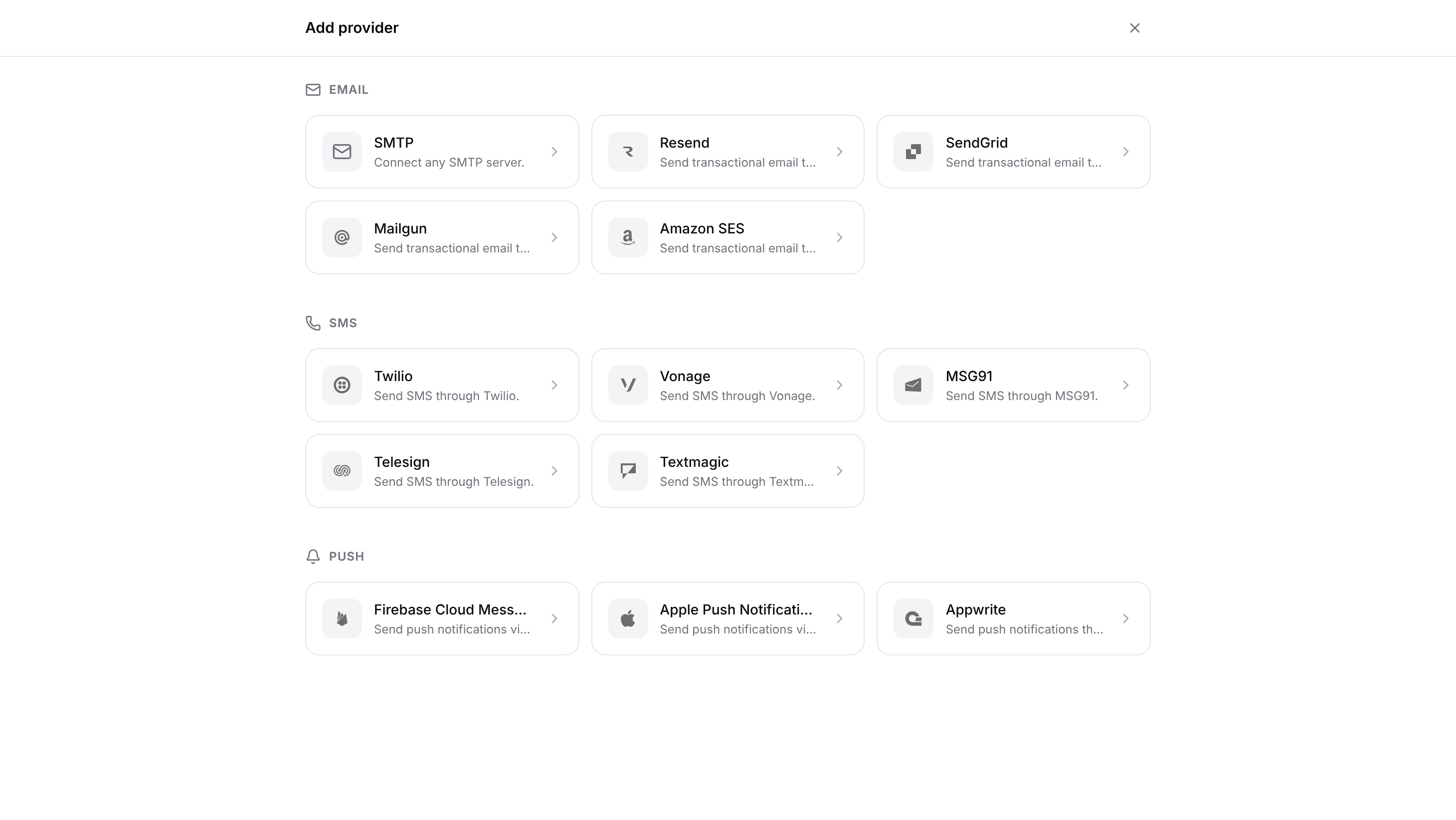
Navigate to Messaging > Providers > Create provider and choose Appwrite under Push.
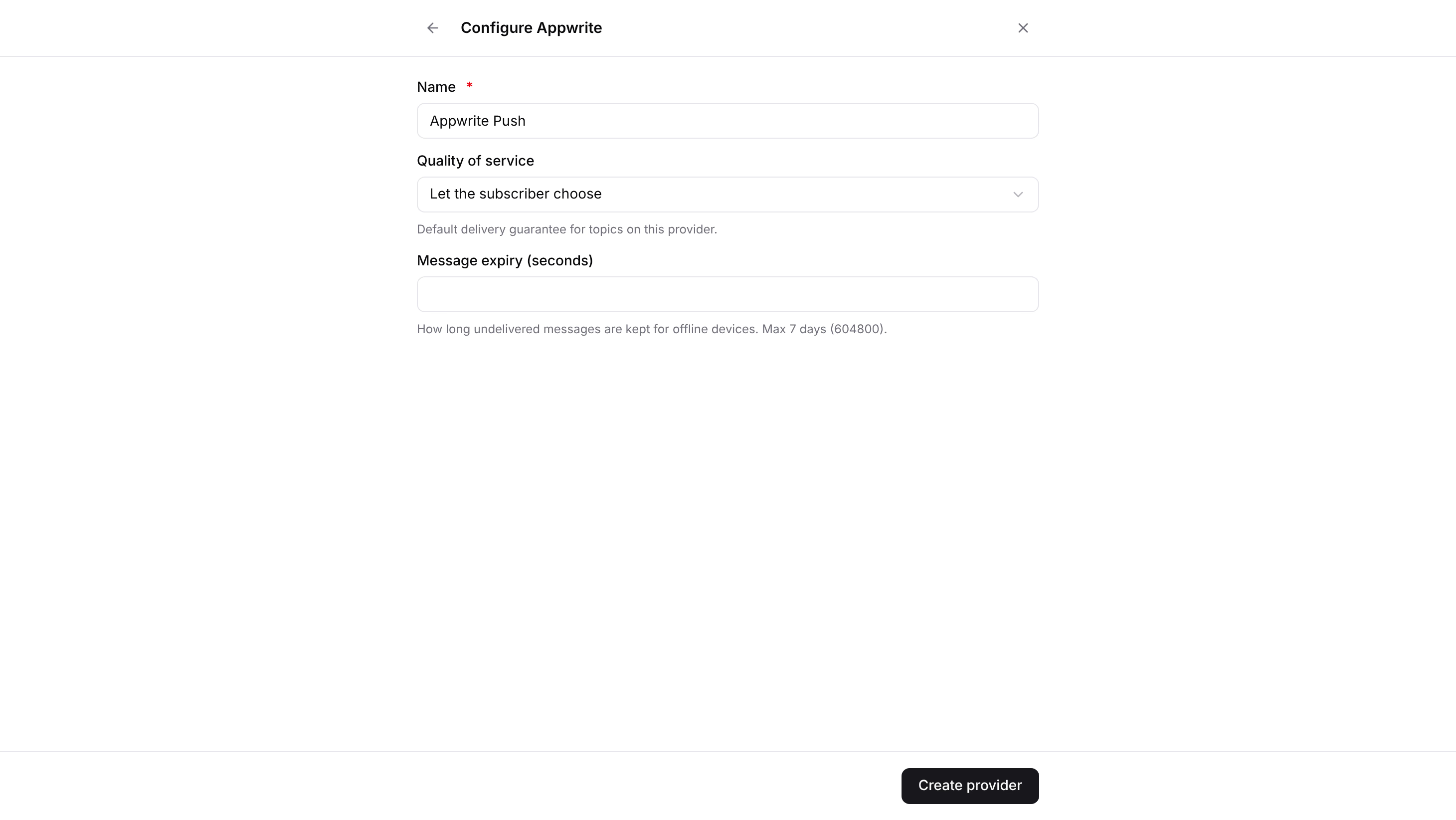
Enter a name for the provider. Appwrite Push doesn't take any credentials. Optionally, change the two delivery settings below, then click Create provider:
- Quality of service: the delivery guarantee for devices that are connected when you send. At most once (QoS 0) sends each message once, and the device doesn't confirm it. At least once (QoS 1) waits for the device to confirm each message, so a message can arrive twice but isn't lost on the way. Let the subscriber choose sends at least once, and an app's subscription can switch to at most once with
retry: false. Messages a device missed while offline are replayed according to the topic's and the subscription's setting. See Offline replay. - Message expiry (seconds): how long, in seconds, messages are kept for offline devices, up to 7 days (
604800). Topics without their own expiry use the lowest expiry across your enabled Appwrite providers, or 7 days if none sets one.0keeps nothing for replay.
You can also create the provider with a Server SDK.
const sdk = require('node-appwrite');
const client = new sdk.Client()    .setEndpoint('https://<REGION>.cloud.appwrite.io/v1') // Your API Endpoint    .setProject('<PROJECT_ID>')                           // Your project ID    .setKey('<API_KEY>');                                 // Your secret API key
const messaging = new sdk.Messaging(client);
const provider = await messaging.createAppwriteProvider({    providerId: sdk.ID.unique(),    name: 'Appwrite Push',    qos: 1,          // optional    expiry: 86400    // optional});
2. Install the SDK
Install the SDK for your platform. Some platforms need extra setup:
On Android, Push needs Android 7.0 (API 24) or later and core library desugaring. Add both to android/app/build.gradle.kts:
android {    defaultConfig {        minSdk = 24    }    compileOptions {        isCoreLibraryDesugaringEnabled = true    }}
dependencies {    coreLibraryDesugaring("com.android.tools:desugar_jdk_libs:2.1.4")}
The appwrite package needs Dart 3.10 and Flutter 3.38.1 or later.
Install the SDK with its peer dependencies. Push needs native modules, so use a development or standalone build. It does not run in Expo Go.
npx expo install react-native-appwrite expo-file-system react-native-url-polyfill react-native-tcp-socket# For background delivery and notification taps on iOSnpx expo install expo-notifications react-native-background-actionsImport the URL polyfill once, before the SDK:
import 'react-native-url-polyfill/auto';If Metro can't resolve the SDK's imports, set config.resolver.unstable_enablePackageExports = true in metro.config.js. Don't add react-native-appwrite to plugins in app.json, because the SDK has no config plugin.
Add the SDK to your app module's build.gradle.kts:
dependencies { implementation("io.appwrite:sdk-for-android:30.0.0")}Push needs Android 7.0 (API 24) or later. The SDK's manifest declares the services, receivers, and permissions background delivery needs. The two permissions for punctual delivery are optional, and you declare them yourself. See Delivery while the app is closed.
Add the package in Xcode under File > Add Package Dependencies, or in Package.swift:
.package(url: "https://github.com/appwrite/sdk-for-apple", from: "21.0.0")Push needs iOS 15, macOS 12, tvOS 15, watchOS 8, or a later version. The Appwrite module has its own App type, so write SwiftUI.App for your app struct. For delivery while the app is suspended, also follow Background delivery on iOS.
3. Subscribe
Sign the user in. Create a Push instance from the same client, then call subscribe. If you pass no topic, subscribe listens on the user's own topic, users/<USER_ID>. Messages you send to that user arrive on this topic.
import { Account, Client, Push } from 'appwrite';
const client = new Client()    .setEndpoint('https://<REGION>.cloud.appwrite.io/v1')    .setProject('<PROJECT_ID>');
await new Account(client).createEmailPasswordSession({ email, password });
const push = new Push(client);
const subscription = await push.subscribe((message) => {    const { notification, data } = JSON.parse(message.data);    console.log(notification?.title, notification?.body, data);});
subscribe returns once the subscription is active. On Android, a background subscription returns once the SDK's background service has taken it over.
Each message has four fields:
topic: the topic the message arrived on.data: the payload as text.payload: the payload as raw bytes.qos: the delivery guarantee the message arrived with,0or1.
Push signs in with the same credential as the client you created it from:
- the session your app created through that client, or
- a JWT or session you set on the client.
Background delivery reconnects later with that credential. A JWT expires, so use a session where you can.
The Web SDK reads the session from localStorage, where it's kept only when your app and your Appwrite API are on different domains, such as example.com and <REGION>.cloud.appwrite.io.
If they share a domain, for example through a custom API domain, set a JWT before you subscribe: client.setJWT((await account.createJWT()).jwt). A JWT expires after 15 minutes, so set a new one before then, or the SDK can't reconnect.
To know when the connection opens, closes, or fails, register these callbacks. Calling one again replaces the earlier callback.
push .onOpen(() => console.log('connected')) .onClose(() => console.log('disconnected')) .onError((error) => console.warn(error.message));To change a subscription's options later, call subscription.update(...). To stop it, call subscription.unsubscribe().
4. Send a message
Send a push notification to the user from the Console or a Server SDK, exactly as you would with FCM or APNs. Navigate to Messaging > Messages > Create message > Push. Add a title and a body, and select the user as the recipient.
const message = await messaging.createPush({ messageId: sdk.ID.unique(), title: 'Your order has shipped', body: 'Track it from the Orders tab.', users: ['<USER_ID>'], data: { orderId: '<ORDER_ID>' }});While the app is on screen, the message reaches your subscribe callback, and mobile apps show no system notification. Once the app is in the background, the SDK shows one. See Notifications and taps.
A message to a user needs no target or topic. Appwrite creates the user's topic the first time you send to it.
Appwrite picks one delivery route for each user, not for each device:
- If any of the user's devices has an FCM or APNs target, all of that user's messages go through FCM or APNs. None of their devices get them over Appwrite Push, web browsers included.
- The Apple SDK creates an APNs target when it subscribes with
background: true.
To keep all of a user's devices on Appwrite Push, register an Appwrite push target on any one of them.
Appwrite push target
A push target on the Appwrite provider tells Appwrite that a device listens over Appwrite Push. You need one to:
- Receive messages sent to topics.
- Show messages while an iOS app is suspended. See Background delivery on iOS.
- Receive messages over Appwrite Push when the user also has FCM or APNs targets. FCM still gets the full notification, so an Android app that registers both can show a message twice. Skip duplicates by
messageId, or register only one of them.
Create the target after each sign-in. Appwrite Push doesn't use identifier, so pass any unique value. Always set providerId to your Appwrite provider's ID. Without providerId, Appwrite assigns the target to one of your enabled push providers, which may not be the Appwrite provider.
import { ID } from 'appwrite';
const target = await account.createPushTarget({    targetId: ID.unique(),    identifier: ID.unique(),    providerId: '<APPWRITE_PROVIDER_ID>'});
Targets belong to the session that created them. When the user signs out with deleteSession, Appwrite deletes that session's targets for you.
Message format
Your callback receives the message as JSON in message.data. A message sent with a title, a body, an image, and data looks like this:
{ "messageId": "6720c5e7...", "notification": { "title": "Your order has shipped", "body": "Track it from the Orders tab.", "image": "https://example.com/parcel.png" }, "data": { "orderId": "<ORDER_ID>" }, "priority": "high"}The fields are:
messageId: the message's ID. With at least once delivery, the default, a message can arrive twice, for example when it's replayed after a reconnect. Use this ID to skip duplicates.notification: the title and body. It also holds any of thesecreatePushoptions you set:icon,color,sound,tag,channelId,badge,action,contentAvailable, andcritical.notification.image: a URL to the image. When you send, pass the image as a Storage file in the form<BUCKET_ID>:<FILE_ID>.data: the custom data you sent.priority:high, unless you set another priority when you sent the message.
Topics
To send the same message to many users, subscribe their devices to a Messaging topic by its ID.
Topic messages are delivered through Appwrite push targets. Add the device's Appwrite push target as a subscriber of the topic, from your server or from the app when the topic's permissions allow it:
await messaging.createSubscriber({ topicId: 'news', subscriberId: ID.unique(), targetId: target.$id});Then subscribe to the topic in the app:
const news = await push.subscribe(['news'], (message) => { showNews(JSON.parse(message.data));}, { background: true, // also notify when the app isn't on screen title: 'News' // notification title when a message has none});Topic IDs must match exactly. Wildcards like + and # are refused, and of the users/ topics, a user can subscribe only to their own. When the user is no longer a subscriber of the topic through any of their targets, Appwrite drops the device's live subscription to it.
Topics have their own delivery settings, the qos and expiry parameters of createTopic and updateTopic:
- Quality of service: a message is delivered at the lowest setting of the provider, the topic, and the subscription.
- Expiry: a topic without its own expiry uses the lowest expiry of your enabled Appwrite providers, or 7 days if none sets one.
Subscription options
| Option | Description | Default |
|---|---|---|
background | Show a notification for each message while the app isn't on screen, and keep delivering in the background where the platform allows. | true when you call subscribe without a topic, false when you pass topics |
title | Notification title to use when a message has none. | The topic name |
retry | Ask for at-least-once delivery (QoS 1), so messages missed while offline are replayed. | true |
notifyInForeground | Also show a notification while the app is on screen. Android, Flutter, and React Native only. | false |
Notifications and taps
A subscription with background posts a notification for each message while the app isn't on screen, using the title, body, and image you sent.
A message with only data reaches your callback without a notification. The exception is a suspended iOS app: Appwrite wakes it through APNs for every message, so a message with only data shows as "New message".
- Android 13 and later: the first background subscription asks for the notification permission. If the user declines, messages still reach your callback.
- Android icon: add a
meta-dataentry to your<application>with your icon. The key isio.appwrite.push.notification_iconfor the Android SDK,io.appwrite.flutter.push.notification_iconfor Flutter, andio.appwrite.reactnative.push.notification_iconfor React Native. - Web: the Web SDK shows a notification for each message on a background subscription while the tab is open, also while the tab is visible. Subscribe from a click handler, because some browsers only show the notification permission prompt after a user action. Mobile browsers don't show these notifications.
To open the right screen when the user taps a notification, read the tap that launched the app at startup and listen for later taps. data is the data you sent with the message.
// The tap that launched the app, reported onceconst opened = await push.getInitialNotification();if (opened) openOrder(opened.data.orderId);
// Taps while the app is runningconst stop = push.onNotificationOpened(({ topic, data }) => openOrder(data.orderId));
On the web, getInitialNotification() always returns null, because a page only receives taps while it is open.
Delivery while the app is closed
How long a device keeps receiving messages after the user leaves your app depends on the platform.
Android
On Android, Flutter, and React Native apps, the SDK saves background subscriptions and wakes the app on a schedule to reconnect. The broker replays what was sent in between, and a notification is posted.
| Device state | How often the app reconnects |
|---|---|
| Android 11 and older, or exact alarms allowed | About every 60 seconds, on time |
| Exempt from battery optimization, no exact alarms | About every 60 seconds, but Android can defer it |
| Android 12 and later, neither of the above | About every 15 seconds, but Android can defer it, for example in battery saver |
| Doze (screen off, idle) | About every 9 minutes |
| Foreground service on | Immediately, also in Doze |
| Force-stopped | When the app is opened again |
A message arrives at the next reconnect, so a deferred reconnect delays it.
For punctual wake-ups, declare these permissions in your manifest. On Android 14 and later, your users allow exact alarms under Settings > Apps > Special app access > Alarms & reminders. Google Play asks you to declare SCHEDULE_EXACT_ALARM.
<uses-permission android:name="android.permission.SCHEDULE_EXACT_ALARM" /><uses-permission android:name="android.permission.REQUEST_IGNORE_BATTERY_OPTIMIZATIONS" />Background delivery is on for every subscription with background set, with nothing else to configure. Push.backgroundStatus() reports how punctual it can be. Its bestEffort flag is read-only and is true when messages can arrive late, or only once the app is opened:
- Exact alarms aren't allowed, and no foreground service is running. A foreground service doesn't count while background usage is restricted.
- The user restricted the app's background usage, and the app isn't exempt from battery optimization.
To make delivery more punctual, tell your users why you need the permission, then request it when they tap a button:
val status = Push.backgroundStatus(context)if (status.bestEffort) { if (!status.exactAlarms) { Push.requestExactAlarms(context) } if (status.backgroundRestricted && !status.ignoringBatteryOptimizations) { Push.requestIgnoreBatteryOptimizations(context) }}requestExactAlarms and requestIgnoreBatteryOptimizations return false when:
- the permission is already granted or isn't needed, or
- the matching permission isn't declared in your manifest.
Flutter and React Native have the same methods on push, without the context argument, and they're async there. Outside Android, backgroundStatus() returns null, and both request methods resolve to false.
For immediate delivery, call push.setForeground(true) while the app is on screen. It runs a foreground service that shows a quiet ongoing notification, and the setting is kept across restarts.
The service is a remoteMessaging foreground service, which Google Play asks you to declare. If you never call setForeground, remove these from your merged manifest with tools:node="remove":
- the push service:
io.appwrite.services.PushServiceon Android,io.appwrite.flutter.services.PushServiceon Flutter, orio.appwrite.reactnative.services.PushServiceon React Native - the
FOREGROUND_SERVICE_REMOTE_MESSAGINGpermission
iOS
These steps apply to apps built with the Apple SDK. Flutter and React Native apps on iOS receive messages only while the app runs and for a short time after it moves to the background. Once iOS suspends the app, messages wait until it opens again, and the broker then replays what was missed.
iOS suspends a backgrounded app within seconds, so the connection can't stay open. With the Apple SDK, Appwrite Push uses APNs to reach a suspended app:
- When you send to a user who has an Appwrite push target, Appwrite sends their iOS devices a short APNs wake-up instead of the full notification.
- A Notification Service Extension in your app opens its own connection, fetches the real message, and replaces the wake-up with its title, body, and image before iOS shows it.
To set it up:
In Xcode, add the Push Notifications capability and the Background Modes capability with Remote notifications to your app target.
Add an APNs provider. The quickest way is one-click APNs setup: run
appwrite init apnsin your iOS project. The CLI creates the sandbox and production APNs providers and adds the Apple platform.Add a Notification Service Extension target to your app, with this class:
Swiftimport Appwriteclass NotificationService: AppwriteNotificationService {}Give the app and the extension the App Groups capability with the same group ID, and set that group ID as
AppwritePushAppGroupin theInfo.plistof both targets. The extension reads the app's session from this group.Set a client ID that you save per install with
client.setPushClientId(...). The default ID is shared by all of the user's iOS devices, so without your own ID, one device's extension can fetch the messages another device was woken for.Register an Appwrite push target after sign-in. Without it, Appwrite sends the full APNs notification instead of the wake-up.
Subscribe with
background: true. The SDK registers the device with APNs and creates its APNs push target for you.
The SDK registers for remote notifications on its own. To handle registration yourself, set AppwritePushAutoRegistration to NO in Info.plist, call UIApplication.shared.registerForRemoteNotifications(), and pass the device token to Push.setDeviceToken(_:) from your app delegate. Push.handleRemoteNotification(_:) and Push.isDelivered(_:) are optional helpers.
Web
Messages arrive while the page is open. To replay messages sent while the tab was closed, give each browser a stable client ID. See Offline replay.
Offline replay
Appwrite stores each message until it expires. When a device subscribes again, Appwrite replays up to the 5 newest messages it missed on each topic, oldest first. Replay needs at-least-once delivery on both the topic and the subscription.
Appwrite tracks replay per client ID, the identifier a device connects to the broker with. A client ID the broker hasn't seen before gets no backlog.
- Android: the SDK derives a stable ID per user and install, so leave
setPushClientIdunset. This includes Flutter and React Native apps on Android. - iOS and the web: all of a user's iOS devices and Flutter web sessions share the default ID. With the Web SDK, the default ID belongs to one browser tab. To replay missed messages, save a client ID per device, for example in the Keychain or
localStorage, and set it withsetPushClientId.
let clientId = localStorage.getItem('pushClientId');if (!clientId) { clientId = crypto.randomUUID(); localStorage.setItem('pushClientId', clientId);}client.setPushClientId(clientId);All tabs of the browser share this ID, so a missed message is replayed to the first tab that reconnects.
A random client ID on every launch loses the backlog.
Sign out
Close Push when the user signs out. It closes the connection and stops background delivery, saved subscriptions included. Deleting the session doesn't close a connection that is already open.
push.close();await account.deleteSession({ sessionId: 'current' });Self-hosting
A self-hosted Appwrite runs the broker in the appwrite-mqtt container. Traefik serves MQTT over TLS on port 8883 and MQTT over secure WebSocket on port 8084. See the MQTT environment variables to change the ports, the replay depth, and the maximum packet size.
Where each SDK connects by default decides what you set up:
- Android, Apple, React Native, and Flutter on mobile connect to
push.<YOUR_API_HOST>on port8883. Apush.DNS record that points at your server is enough. - Web, and Flutter on the web, connect to
wss://push.<YOUR_API_HOST>on port443, which Traefik doesn't serve. Set the broker address on these clients.
You can also set the broker address on any client instead of adding the DNS record:
client.setPushEndpoint('mqtts://appwrite.example.com:8883'); // Android, Apple, React Native, Flutter on mobileclient.setPushEndpoint('wss://appwrite.example.com:8084'); // Web, Flutter on the webA Flutter app that runs on both picks the endpoint with kIsWeb.
Limits
| Limit | Value |
|---|---|
| Message retention | Up to 7 days |
| Replay per topic | Newest 5 missed messages |
| Title and body | 256 characters for the title and 64,230 for the body, the limits of createPush |
| Connections | 128 new connections per user per minute. On self-hosted Appwrite, this applies when _APP_OPTIONS_ABUSE is enabled. |
Troubleshooting
| Symptom | Cause and fix |
|---|---|
subscribe() throws "needs a signed-in user" | The user isn't signed in through this client, and no JWT or session is set on it. |
| A topic subscription is refused | The user isn't a subscriber of the topic, or the topic ID has a wildcard. |
| Topic messages never arrive | The device has no Appwrite push target subscribed to the topic. |
| A user with FCM or APNs targets gets nothing over Appwrite Push | Register an Appwrite push target for the device. |
| Messages sent while offline never arrive | A client ID shared by several devices, which is the default on iOS, or tied to one tab, which is the default with the Web SDK. Also check that retry isn't false and that the message hasn't expired. See Offline replay. |
| No notification while the app is open | Expected. Set notifyInForeground to true on Android, Flutter, or React Native. |
| Nothing arrives while the Android app is closed | Notification permission declined, the app was force-stopped, or exact alarms aren't allowed. Check backgroundStatus().bestEffort. |
| iOS devices get no APNs notifications, or debug builds use the production provider | No enabled APNs provider matches the app's bundle ID and build: sandbox for debug and Simulator builds, production for TestFlight and App Store builds. Rerun appwrite init apns to create both, or set the bundle ID on the provider in the Console. Devices pick up the change the next time the app launches. |
| iOS shows "New message" instead of the real message | The Notification Service Extension is missing, the extension target doesn't include the Appwrite library, or AppwritePushAppGroup isn't set to a group both targets share in both Info.plist files. |
| The UI freezes or the app stops responding on Android | Call subscribe off the main thread. |
| React Native fails with "background delivery needs the SDK's native Android module" | The app runs in Expo Go, or wasn't rebuilt after installing. |
Was this page helpful?
Share what worked or what we should fix. Once approved, our agents automatically apply suggested updates to the docs.