Announcing API for spatial columns: Build scalable location-aware apps with ease_
Handle maps, geofencing, routing, and compliance zones natively in Appwrite

Working with geographic data has always been tricky. If you’ve ever tried building “find nearby” or geofencing features, you’ve probably ended up storing coordinates as generic arrays or strings and then writing custom logic in your app to filter, compare, and compute relationships between locations.
It works at first, but as your data grows, you start to feel the pain: queries get slow, results become imprecise, and maintaining it all gets expensive.
That’s why we’re introducing Spatial columns and queries. Now, you can store points, lines, and polygons directly in Appwrite Database, index them efficiently, and query how they interact with each other. No hacks or workarounds required.
Store and query geo data directly in your database
Appwrite now gives you first-class geo primitives and queries.
Here’s what you get:
New column types
point: Perfect for things like bus stops, delivery drop-offs, or user check-ins.line: Ideal for routes, bike paths, or utility lines.polygon: Great for delivery zones, property boundaries, or compliance regions.
New index type
spatial: Built to keep geo queries lightning fast, even when your dataset grows into the millions.
12 new geo query operators
crossesnotCrossesdistanceEqualdistanceNotEqualdistanceGreaterThandistanceLessThanintersectsnotIntersectsoverlapsnotOverlapstouchesnotTouches
Practical applications
With these new capabilities, you can go far beyond simple “find nearby” queries and start answering richer spatial questions in your applications.
For example, you could
- Check which delivery routes (lines) intersect with a flood zone (polygon).
- Identify all customers (points) who fall outside of a service area (polygon).
- Find every bike trail (line) that touches the boundary of a city park (polygon).
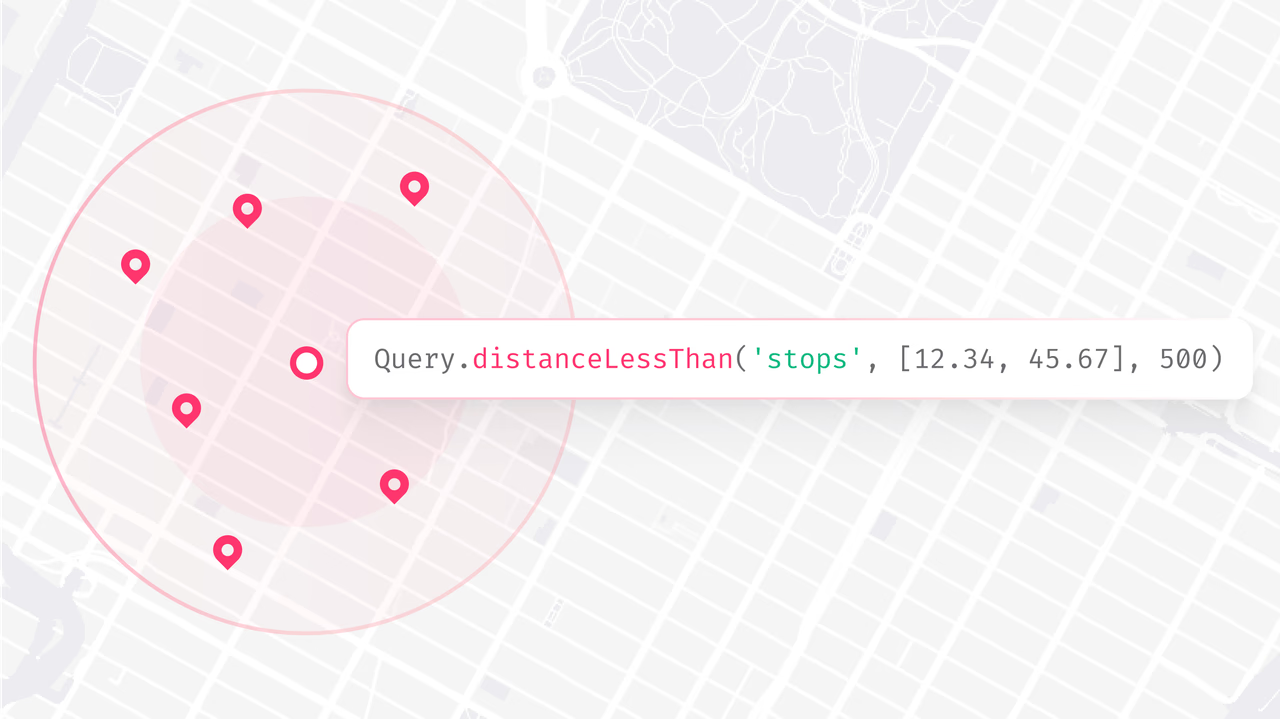
And of course, you can still keep it simple, like using a point column to store bus stop locations and running a distanceLessThan query to instantly find all bus stops within 200 meters of a user’s house.
Immediate benefits
Spatial columns don’t just make things easier; they open the door to entirely new workflows and capabilities:
- Accurate geo logic: Built-in support for predicates like intersects, overlaps, and touches.
- Fast lookups: Queries are powered by spatial indexes designed for scale.
- Cleaner code: No more geometry libraries in your application layer.
- Real-world workflows: Geofencing, delivery radii, route coverage, region lookups, property boundaries, and compliance zones. All handled natively.
What you need to know before using it
Before you dive in, here are a few important things about Spatial columns:
- Use spatial indexes: Queries without a spatial index will work, but won’t perform well at scale.
- Choose the right type:
point→ single locations (shops, vehicles, users)line→ paths and routespolygon→ service areas, regions, or geofences
- Composability: Spatial queries can be combined with other filters for powerful workflows.
Availability
Spatial columns and queries are now available on Appwrite Cloud and will arrive self-hosted in the next release.
If you’re building maps, logistics, travel, mobility, real estate, or safety and compliance features, this unlocks the geo foundation you’ve been waiting for. From search-nearby to geofencing, from routing coverage to compliance zones, you can now handle it all natively inside Appwrite.
Define your spatial columns, add a spatial index, and start building location-aware apps that scale without workarounds.
More resources
Spatial columns are first-class geographic data types: point for single locations, line for paths and routes, and polygon for regions and boundaries. They let you store geometry directly in Appwrite Databases without serializing coordinates into strings or arrays.
Appwrite ships 12 geo operators: crosses, notCrosses, distanceEqual, distanceNotEqual, distanceGreaterThan, distanceLessThan, intersects, notIntersects, overlaps, notOverlaps, touches, and notTouches. These cover the common spatial predicates needed for geofencing, routing, and proximity search.
A spatial index is a data structure designed to accelerate geometric queries like point-in-polygon or nearest-neighbor lookups. Without one, spatial queries scan every row and slow down as data grows. Appwrite supports a spatial index type that you should add to any column you query geographically.
Use the distanceLessThan operator with the target point and a radius in meters. For example, a query that returns all bus stops within 200 meters of a user's location. Pair the query with a spatial index on the column for fast lookups even at scale.
A point is a single coordinate (latitude and longitude). A line is an ordered sequence of points forming a path, useful for routes and bike trails. A polygon is a closed region defined by a sequence of points, used for delivery zones, service areas, and compliance regions.
Spatial columns are available on Appwrite Cloud and arrive on self-hosted in the next release. Once you are on a supported version, define the column, add a spatial index, and start running geo queries directly from your SDK.