Announcing Transactions API: Reliable multi-record writes across tables_
Appwrite introduces a new Databases feature called Transactions API. This new feature allows developers to group multiple operations across tables and commit them in a single atomic action, ensuring data consistency and eliminating partial writes.

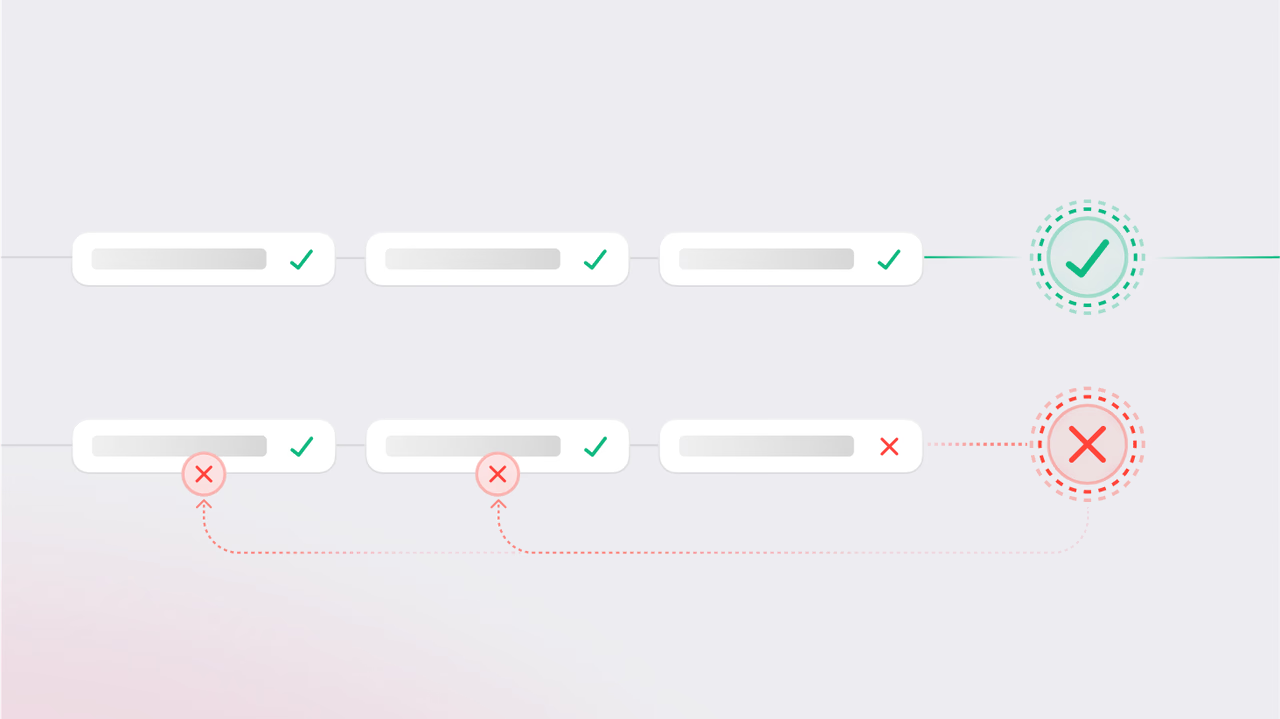
When dealing with multi-step workflows, like order processing or data syncs, it's not enough for some of your writes to succeed. You need every operation in the sequence to succeed together, or not happen at all. Anything less leads to incomplete states, corrupted records, and systems that are harder to reason about.
To solve this, we're introducing a new Databases feature, Transactions API.
With this feature, you can stage multiple operations across one or more tables, and commit them only when you’re ready. If every operation checks out, Appwrite commits them in one atomic action. If anything fails, whether due to permissions, conflicts, validations, or other reasons, Appwrite automatically rolls everything back.
No more partial writes or manual rollbacks
Previously, a failed operation in a multi-step workflow meant incomplete data, inconsistent states, and hours spent writing custom rollback logic to clean things up. A failed user provisioning flow might leave a user without permissions, or a failed checkout might log the order but miss the payment.
With the Transactions API, those issues disappear. All operations are staged and validated together, and if one fails, nothing is written. Your data stays clean, your logic stays simple, and your system remains predictable, even when things go wrong.
How it works
The Transactions API introduces a structured flow for handling multi-step record operations with atomic guarantees. Here’s how it works under the hood:
Create a transaction
Start by creating a transaction. The server responds with a transaction object including the $id, which is used to link all subsequent operations.
Stage operations (incremental or batch)
Use this transactionId in your standard create, update, or delete calls. These operations are staged, queued on the server, but not executed until you commit. You can stage operations one at a time or use the bulk staging endpoint to queue multiple in a single request.
Each transaction has a time-to-live (ttl) value that defines how long it remains active. Once it expires, the transaction is automatically cleaned up and can no longer be used for staging or committing operations.
Commit
When ready, commit the transaction. Appwrite validates all staged operations (permissions, schema, revision checks) and applies them in one atomic write. If any operation fails, none are applied. Everything is rolled back.
Abort (optional or automatic)
You can explicitly abort a transaction or let it expire. Idle transactions are automatically cleaned up after a configurable timeout, anywhere between 1 minute and 1 hour, with a default of 5 minutes, to avoid resource leaks or incomplete workflows.
This flow isolates your changes until you're confident they’re valid, giving you a safe way to manage complex, interdependent writes, especially useful in scenarios like user provisioning, multi-table updates, or third-party sync operations.
Example
Here’s an example showing how to stage multiple operations across different tables within a single transaction:
const tx = await tablesDB.createTransaction();

await tablesDB.createOperations({
  transactionId: tx.$id,
  operations: [
    {
      action: 'create',
      databaseId: '<DB_A>',
      tableId: '<TABLE_1>',
      rowId: 'u1',
      data: { name: 'Walter' }
    },
    {
      action: 'increment',
      databaseId: '<DB_B>',
      tableId: '<TABLE_2>',
      rowId: 'u2',
      data: { value: 1, min: 0, column: 'credits' }
    }
  ]
});
For more examples and API details, check out the Transactions API documentation.
Key benefits
- ACID transactions: Ensures atomicity, consistency, isolation, and durability across all staged operations.
- No manual rollbacks: Appwrite handles failure cleanup automatically.
- Safe retries: No partial state means simpler retry logic.
- Reduced race conditions: Ops are validated and committed together.
- Centralized validation: Permissions and conflicts checked at commit time.
- Batch-friendly: Efficient bulk staging for migrations and sync jobs.
Get started
The Transactions API is now available on Appwrite Cloud.
You can start by wrapping your multi-step logic, like order processing, user provisioning, or data sync workflows, inside a single transaction for consistent and predictable results. Every operation stays isolated until you commit, ensuring that your data only changes when everything succeeds.
Whether you’re building systems that require strict reliability or just want to avoid writing manual rollback logic, the Transactions API give you a safer foundation for complex operations.
More resources
The Transactions API lets you stage multiple create, update, or delete operations across one or more tables and commit them atomically. If any operation fails validation at commit time, none are written and Appwrite rolls everything back, so you avoid partial writes and inconsistent state.
ACID stands for Atomicity, Consistency, Isolation, and Durability. Atomicity means all operations succeed or none do. Consistency means the database moves from one valid state to another. Isolation means concurrent transactions do not see each other's intermediate state. Durability means committed data persists even after failures.
Call createTransaction() to get a transaction id, then use that id when calling create, update, or delete operations to stage them. When you are ready, commit the transaction in a single atomic write. You can also abort or let it expire if you change your mind.
Each transaction has a configurable time-to-live, between 1 minute and 1 hour, with a default of 5 minutes. If you do not commit or abort within that window, Appwrite automatically discards the staged operations to avoid resource leaks.
Yes. A single transaction can include operations across different tables and even different databases in your project. This is useful for workflows like order processing that need to update inventory in one table, create an order in another, and adjust user credits in a third.
Reach for transactions any time a workflow requires multiple writes to succeed together or roll back together. Common cases include checkout flows, user provisioning, multi-table data syncs, and migrations. See the Appwrite Databases documentation for full API details.