We've built the fastest way to create a one-click remote MCP server by mistake_
We built an email client on Appwrite to test a new feature, then asked an agent for a remote MCP server with OAuth 2.1. It was in production in under a minute.

We were not trying to build an MCP platform. We were testing a feature that hasn't shipped yet: email triggers for Appwrite Functions, where an incoming email executes your function the same way an HTTP request or a cron schedule does. To test it honestly, we needed something that receives real mail, so we built an email client.
It got out of hand in the good way. Inbox, threads, full-text search, attachments, labels, rules, snooze, send later, vacation replies, two-factor sign-in, and a mobile layout. All of it runs on one Appwrite project, and it is open source.
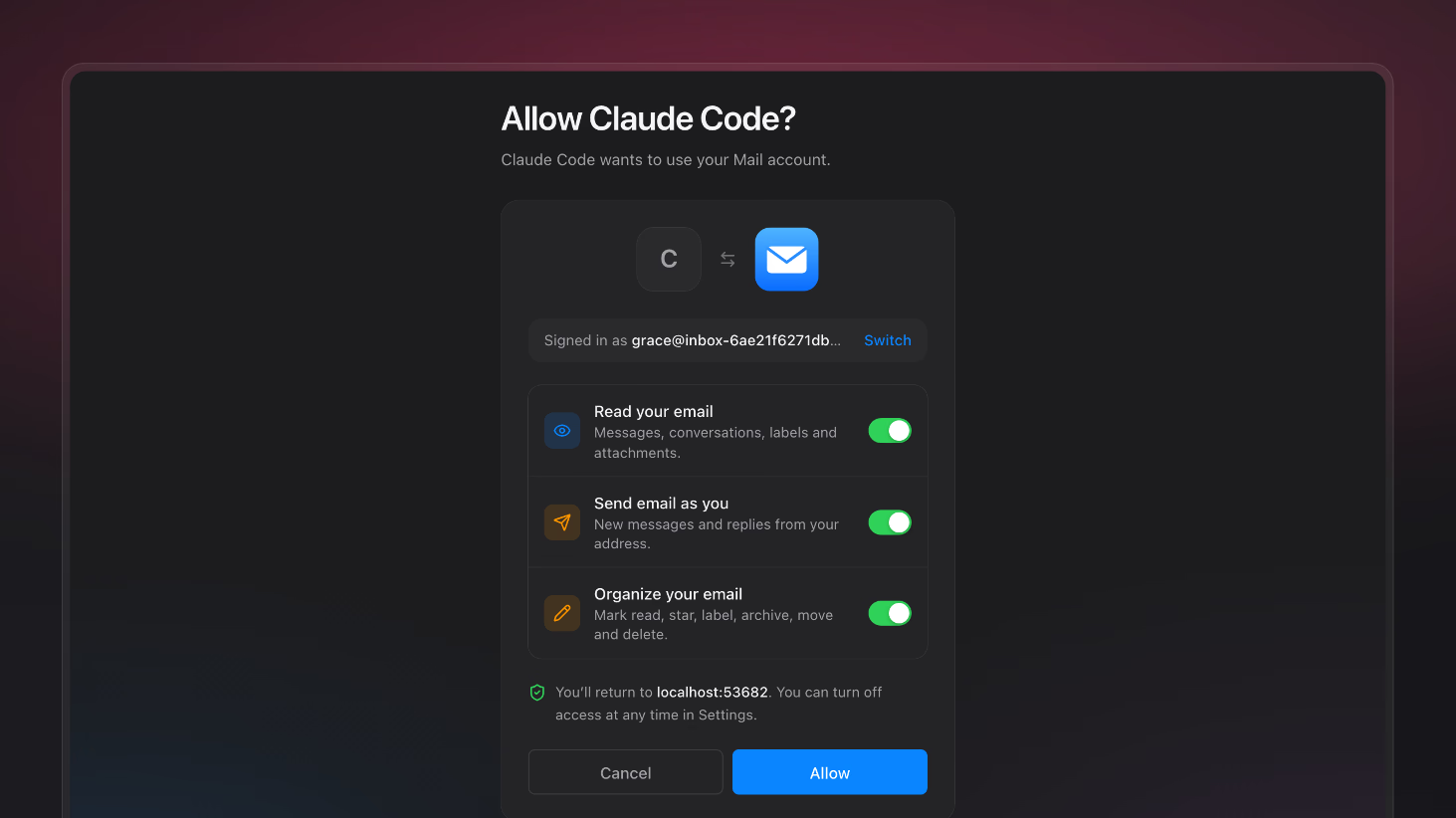
Then we did what we now do with everything we build: we pointed our agents at it. We asked a coding agent to give the mail app a remote MCP server so Claude could read and triage the inbox. Less than a minute later, the MCP server was deployed to production. A minute after that, Claude was connected and archiving newsletters. The connection took one click, one sign-in we already had, and one consent screen. Nobody copied a client ID, generated an API key, or edited a config file.
The mail app's landing page uses that exchange as its example. One sentence from the user turns into four tool calls: find the unread mail, archive the newsletters, read the thread, and reply in it.
The agent writing code quickly was not the surprise. Agents write code quickly. The surprise was that there was nothing left to set up. Every piece a production remote MCP server needs was already sitting in the project, wired to everything else.
What a remote MCP server actually needs
A local MCP server is a process on your laptop that trusts whoever started it. A remote MCP server is a public service that strangers' AI tools call on behalf of your users, so the MCP authorization specification puts a full OAuth 2.1 deployment in front of it. To ship one, you need:
- A public HTTPS endpoint that speaks MCP over Streamable HTTP.
- Protected resource metadata (RFC 9728), plus a
401with aWWW-Authenticateheader pointing to it, so clients can discover who issues tokens for you. - An OAuth 2.1 authorization server with PKCE, discovery metadata (RFC 8414), and resource indicators (RFC 8707) so a token minted for your MCP server is useless anywhere else.
- A way for clients nobody registered to introduce themselves, through dynamic client registration (RFC 7591) or client ID metadata documents. Thousands of AI tools exist, and none of their developers will fill in a form on your developer portal first.
- A sign-in and consent screen inside your product, for your users, in your design.
- Token verification and scope checks on every call, followed by data access as that user and only that user.
- Revocation, so users can see what they connected and take it back.
None of these pieces is exotic. Each one is a known specification with good libraries. What makes remote MCP slow to ship is not any single piece. It is that the pieces normally live at different companies.
Why hosting, data, and auth rarely live together
Look at how most products are deployed today. The frontend sits on a hosting provider. The data sits on a database provider. Identity sits on an auth provider. Each vendor is very good at its slice, and each one draws its product boundary exactly where its slice ends.
Remote MCP cuts straight across those boundaries. The endpoint is a hosting problem. The token is an identity problem. The tools are a data problem. And the consent screen is all three: it is a page you host, for a user someone else authenticates, approving access to data a third party stores.
Stitched across vendors, the work moves into the seams:
- Your MCP endpoint has to trust tokens issued by your auth vendor, so you configure issuers, audiences, and key rotation between two dashboards.
- The
subin that token is an ID in the auth vendor's system. Your rows are owned by an ID in your database. You write the mapping and keep it in sync. - The consent screen has to run on your domain, call the auth vendor's grant APIs, and read your database to explain what is being requested.
- Redirect URIs, CORS, and secrets now span three products and three sets of environment variables.
To be fair, several auth providers now ship MCP authorization, and it works. But their tokens still prove who the user is in one system while the data lives in another, and the bridge between the two is still yours to write and operate.
In an Appwrite project, there is no bridge. The user who signs in to the mail app, the sub in the access token Claude presents, and the owner on the database rows are the same user ID in the same project. The consent page is a route on the same Site. The MCP endpoint runs in the same project, either as a Function or as a server route on that same Site, reading the same tables with the same permission model. That is not a clever integration. It is what happens when hosting, data, and auth share one roof, and it only became an MCP story when we released the OAuth2 server, which lets an Appwrite project act as an OAuth 2.1 and OpenID Connect provider.
How the mail app's MCP server works
Here is the whole app, one row per Appwrite product:
| Product | What the mail app uses it for |
|---|---|
| Auth | Email and password, email codes, TOTP two-factor, sessions, and the OAuth2 server that signs in MCP and API clients |
| Functions | inbox (the email trigger), api (sending and account actions), public (REST API and remote MCP server), maintenance (a cron for send-later and snooze) |
| Databases | Mailboxes, messages, drafts, contacts, labels, and API keys in TablesDB, with row-level permissions and a full-text index |
| Storage | An encrypted attachments bucket with antivirus scanning |
| Messaging | Outbound mail to external addresses |
| Realtime | New mail and state changes synced across tabs |
| Sites | The web app, including the OAuth consent screen at /oauth/consent |
The MCP server is the public function, served from its own domain.
A Function is one option, not a requirement. An MCP server is a handful of HTTP routes, so it runs just as well as a server route on an Appwrite Site rendered with SSR, next to the consent page and on the app's own domain. We used a Function so the MCP server deploys and scales on its own. Pick a Site route when you want the app and its MCP server to ship as one deployment. Everything below works the same either way.
In the same change, the agent added the consent route to the Site and a developer page that gives users the server URL, an install path for each major client, and the scope every tool needs:
That page is the entire setup guide a user needs. Here is every step of the handshake behind it, as curl sees it. The examples use a placeholder domain.
The 401 that starts everything
An MCP client that calls the server without a token gets a 401, and the WWW-Authenticate header tells it where to look next:
curl -i -X POST https://mail-api.example.com/mcp \
  -H 'Content-Type: application/json' \
  -d '{"jsonrpc":"2.0","id":1,"method":"tools/list"}'
HTTP/2 401
www-authenticate: Bearer resource_metadata="https://mail-api.example.com/.well-known/oauth-protected-resource/mcp"
x-appwrite-traffic-type: function
The client finds the authorization server
The protected resource metadata names the project's OAuth2 server and the scopes this server understands:
{
    "resource": "https://mail-api.example.com/mcp",
    "authorization_servers": ["https://fra.cloud.appwrite.io/v1/oauth2/<PROJECT_ID>"],
    "scopes_supported": ["mail.read", "mail.send", "mail.modify"],
    "bearer_methods_supported": ["header"],
    "resource_name": "Mail MCP"
}
The function serves this document itself, about ten lines of code. The authorization server it points to is not code anyone wrote for this app. It is the project's built-in OAuth2 server, switched on in the Console under Auth, with three custom scopes added and the authorization URL set to the Site's consent route.
The client introduces itself
The project's discovery document at /.well-known/openid-configuration advertises a registration_endpoint and client_id_metadata_document_supported: true. That covers both ways an unknown client can identify itself. Claude Code uses a client ID metadata document: its client ID is a URL it controls, and the project fetches that URL to learn the client's name and redirect URIs. Other clients call the registration endpoint and get a client ID back immediately.
If "any AI tool can get a client ID" sounds alarming, look at what a client ID grants: nothing. It lets a tool start an authorization request. Access still requires your user to sign in and approve specific scopes on your consent screen.
The user approves on your page
The authorization request lands on the project's OAuth2 server, which redirects the browser to the Site's /oauth/consent route with a grant ID. Because the user is already signed in to the mail app in that browser, there is no second login. The page loads the grant, shows the requesting client and its scopes in plain language ("Send email and replies from your address"), and calls approve or reject. Appwrite then redirects back to the client with an authorization code, and the client exchanges it for tokens using PKCE.
This is the "one click". It is not a shortcut around OAuth. It is the full authorization code flow, and it feels like one click because identity, consent, and the app share one project and one session.
The function verifies tokens offline
Access tokens from the OAuth2 server are signed JWTs. The function verifies them against the project's JWKS with jose, with no call back to Appwrite on the request path:
export const ISSUER = `${ENDPOINT}/oauth2/${PROJECT_ID}`;
const RESOURCE = 'https://mail-api.example.com/mcp';
const jwks = createRemoteJWKSet(new URL(`${ISSUER}/.well-known/jwks.json`));

async function fromAccessToken(token) {
  const { payload } = await jwtVerify(token, jwks, {
    issuer: ISSUER,
    audience: RESOURCE,
    typ: 'at+jwt',
  });
  return {
    userId: String(payload.sub),
    scopes: String(payload.scope || '').split(' ').filter(Boolean),
  };
}
Three checks carry the security. issuer proves the token came from this project. audience proves it was minted for this server, because the client sent the MCP server's URL as its resource during authorization. And typ: 'at+jwt' rejects ID tokens, which the same server signs with the same keys but which were never meant to grant API access.
Keep the audience check strict. The mail app's first version also accepted the project-wide audience that tokens carry when a client requests them without a resource indicator, so its REST API would work for simpler clients. On an MCP endpoint, that fallback lets any token from the project with matching scopes through, including one minted for a different API. Accept only the MCP server's own URL.
Tools follow scopes
The server handles JSON-RPC directly, without an MCP SDK. Its eight tools each declare the scope they need, and tools/list only returns the tools the token can actually call:
case 'tools/list':
  return rpcResult(id, {
    tools: TOOLS.filter((t) => ctx.auth.scopes.includes(t.scope)).map(
      ({ name, title, description, inputSchema, annotations }) => ({ name, title, description, inputSchema, annotations }),
    ),
  });
A user who grants only mail.read gives their assistant list_messages, read_message, and read_thread. send_email and update_messages never appear in the model's tool list, so the model cannot be talked into calling them. Every tool call checks the scope again before it runs.
The whole public function, REST API and OpenAPI spec included, is around 400 lines of JavaScript. Here is everything that is not in it: an authorization server, a client registry, a session store, signing key management, a user table sync, a consent backend, TLS certificates, and DNS. The project already had all of it.
Why under a minute was possible, and why it is still secure
When the agent added the MCP server, its task list was short: turn on the OAuth2 server, set the authorization URL, add three scopes, add a consent route to the Site, write one function file, and deploy. The deploy issued an HTTPS domain. There was no vendor to sign up for, no second dashboard, and no secret to copy between systems.
Speed usually costs security. Here the security properties come from the authorization server, not from the 400 lines the agent wrote:
- PKCE is required for public clients, which is what AI tools are.
- Redirect URIs match exactly, and refresh tokens rotate on every use with reuse detection.
- Access tokens are short-lived, one hour by default for public clients, and bound to the MCP server's URL.
- Data access stays inside row-level permissions, filtered to the token's user.
- Consents are revocable, within the token lifetime. Each approval is stored on the user's account, and the Account API lists and deletes them, so a "connected apps" page is two SDK calls. Deleting a consent stops the client from getting new tokens. Because the server verifies tokens offline, a token it already holds keeps working until it expires, within an hour for AI tools. To shorten that window, lower the access token lifetime in the OAuth2 server settings.
The agent did not implement any of those guarantees, so it could not get any of them subtly wrong.
Trade-offs worth knowing
This is not free of constraints, and you should know them before you copy the pattern:
- The OAuth2 server is an Appwrite Cloud feature. Self-hosted Appwrite does not include it today.
- Functions return one response per request. The mail app's server answers tool calls with plain JSON rather than a long-lived stream. That fits request and response tools like these. If your tools stream long-running progress, design for that.
- Consolidation is a choice. Putting hosting, data, and identity in one project is exactly why this was fast. It also means one platform carries all three. The mitigation is that every interface here is an open standard: OAuth 2.1, OpenID Connect, JWKS, and MCP. Any OAuth library works against the project, any JWT library verifies its tokens, and the rest of Appwrite is open source and self-hostable.
- Email triggers have not shipped yet. The mail app runs on a preview of the feature. We will write about it properly when it is generally available.
Build a one-click MCP server on Appwrite Cloud
You do not need an email client, and you do not need to follow any of the steps in this post. Every one of them is an API call, so your agent can make them for you.
Connect your agent to the Appwrite MCP server:
claude mcp add --transport http appwrite https://mcp.appwrite.io/
Run /mcp, choose appwrite, and sign in to your Appwrite account. Then ask for what you want:
> Add a secure remote MCP server to my "Acme" project.
That is the whole setup. The agent turns on the OAuth2 server, defines scopes for your data, adds a consent page to your Site, writes the MCP server and deploys it as a Function or as a route on your Site, and hands you the URL to share. Nothing for you to configure, and nothing to wire between vendors.
Everything above this section is what happens behind the scenes, and it is worth knowing if you want to audit the result. Review what the agent builds the way you would review any pull request: the scopes it defined and the tools it exposed. But the scary truth is that you do not need to understand any of it. It just works.
Start on Appwrite Cloud, then read:
A remote MCP server is an HTTPS endpoint that AI tools such as Claude, ChatGPT, Cursor, and VS Code call to work with a product on a user's behalf. One-click means the user pastes a URL or presses an Add button, signs in, approves access on a consent screen, and is connected. No client IDs, API keys, or config files change hands.
The MCP authorization specification builds on OAuth 2.1. The server answers unauthenticated requests with a 401 that points to its protected resource metadata (RFC 9728), which names an authorization server. That server needs PKCE, discovery metadata, resource indicators so tokens are bound to one server, and a way for unknown clients to identify themselves through dynamic client registration or client ID metadata documents. The Appwrite OAuth2 server implements all of these for your project.
Claude Code uses a client ID metadata document: its client ID is a URL it controls, and the authorization server fetches that URL to read the client's name and redirect URIs. Other clients use dynamic client registration and receive a client ID from a registration endpoint on the spot. An Appwrite project's discovery document advertises both.
Yes, because a client ID grants nothing on its own. It only lets a tool start an authorization request. The user still has to sign in to your product and approve the requested scopes on your consent screen, and the resulting access token is short-lived, bound to your MCP server's URL, and limited to those scopes.
Yes, on either. An Appwrite Function gets its own HTTPS domain on deploy and scales separately from your web app. A server route on an Appwrite Site rendered with SSR can serve the same endpoint next to your consent page, on your app's domain. Either way, the server answers /mcp and its metadata document and verifies access tokens offline against the project's JWKS.
Connect your AI agent to the Appwrite MCP server at https://mcp.appwrite.io/, sign in to your Appwrite account, and ask the agent to add a secure remote MCP server to your project. The agent enables the OAuth2 server, defines scopes, adds a consent page to your Site, and deploys the MCP endpoint as a Function or as a route on your Site. You do not configure anything yourself.
Yes. The full source, including the Site, the Functions, the MCP server, and the setup scripts, is at github.com/appwrite/email.