Announcing domain updates for Appwrite Sites and Functions_
Update a custom domain on Appwrite Sites or Functions to serve another branch or redirect somewhere new, without touching its DNS records or its certificate.

A custom domain on Appwrite Sites or Functions has always been set up once. You picked whether it served the active deployment, a Git branch, or a redirect, and that choice stuck. Pointing staging.example.com at a new release branch, or changing where an old marketing domain redirects, meant deleting the domain and adding it again. The domain stopped serving the moment you deleted it and only came back after Appwrite verified it and issued a certificate again.
Today, we are announcing domain updates for Appwrite Sites and Functions. You can now change what a custom domain serves from the Appwrite Console or the API, and the domain keeps working the whole time.
What domain updates give you
- Switch between the active deployment and a branch. Serve a branch while you test a release, then put the domain back on the active deployment.
- Change the branch. Move a staging or preview domain from one branch to another.
- Edit a redirect. Change the destination URL or the status code, for example from a temporary
302to a permanent301once a move is final. - Keep your DNS setup. The domain keeps its DNS records, verification status, and TLS certificate, so there is nothing to change at your DNS provider.
- A guard against empty branches. Appwrite refuses to move a domain to a branch with no successful deployment, so the domain never ends up with nothing to serve.
- The same changes from your server.
updateSiteRule,updateFunctionRule, andupdateRedirectRuleon the Proxy service make the same changes, and can also move a domain to another site or function in the same project.
Update a domain in the Appwrite Console
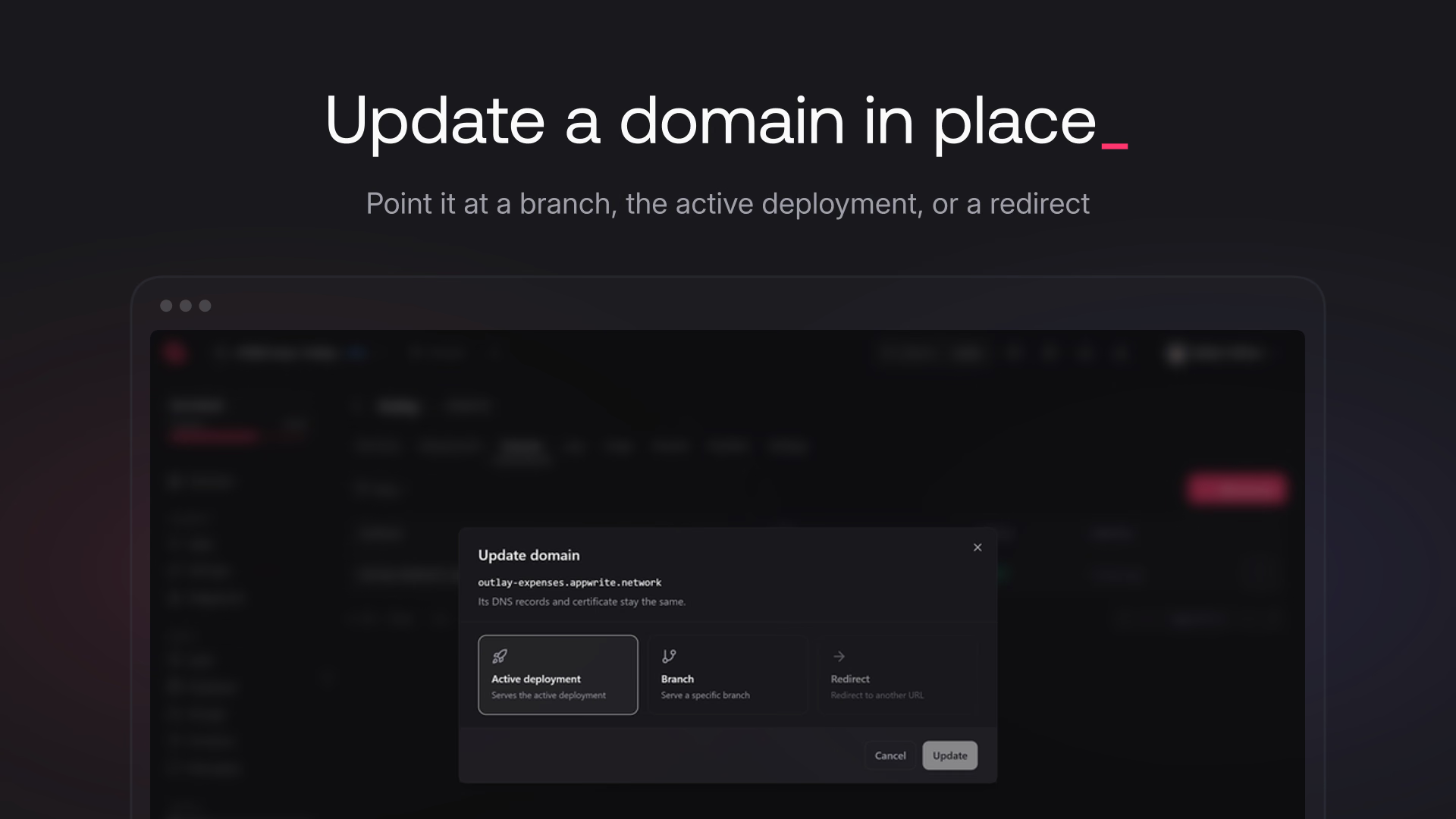
Open your site or function in the Appwrite Console and go to the Domains tab. Click the three-dots menu at the end of the domain's row, or right-click the row, and click Update.
The Update domain dialog shows the domain and the same target options you saw when you added it: Active deployment, Branch, and Redirect. Pick the new target and click Update. The button stays disabled until you change something, and a redirect URL is checked before anything is sent.
What you can change depends on how the domain was added:
- A domain that serves the active deployment or a branch can switch between the two, or move to a different branch.
- A redirect domain can change its destination URL and its status code:
301,302,307, or308.
A domain can't switch between serving a deployment and redirecting. The option for the other kind stays visible but disabled, and its tooltip explains why. To make that change, delete the domain and add it again.
Serving a branch needs a connected Git repository. Without one, the Branch option is disabled until you connect a repository to the site or function.
Update a domain from your server
The Proxy service exposes one update method for each kind of domain. Use an API key with the rules.write scope and the rule ID, which you can look up with listRules. This example puts a staging domain on a release branch, then back on the site's active deployment:
import { Client, Proxy } from 'node-appwrite';

const client = new Client()
    .setEndpoint('https://<REGION>.cloud.appwrite.io/v1')
    .setProject('<PROJECT_ID>')
    .setKey('<API_KEY>');

const proxy = new Proxy(client);

// Serve the newest successful deployment from the release branch
await proxy.updateSiteRule({
    ruleId: '<RULE_ID>',
    siteId: '<SITE_ID>',
    branch: 'release-2.0',
});

// Leave out branch to serve the site's active deployment again
await proxy.updateSiteRule({
    ruleId: '<RULE_ID>',
    siteId: '<SITE_ID>',
});
When to update a domain
Update a domain whenever its job changes but its name doesn't:
- Staging domains that follow a release. Point
staging.example.comatrelease-2.0while QA tests it, then atrelease-2.1for the next cycle. - Testing on a real hostname. Serve a branch on a domain that already has cookies, OAuth2 redirect URLs, or webhooks configured for it, then switch back to the active deployment.
- Redirects that outlive their plan. Change where a campaign domain lands, or make a temporary redirect permanent once you're sure.
- Rebuilding a project. Move a domain to a new site or function from your server once the replacement is ready, instead of deleting and re-adding it.
For production domains, the active deployment is still the right default. Git automation already decides which pushes go live there, so an update is for the domains you want to steer by hand.
Getting started with domain updates in Appwrite
Domain updates are live on Appwrite Cloud today and ship in the next self-hosted Appwrite release. Open the Domains tab of any site or function to try them.
Open your site or function in the Appwrite Console, go to the Domains tab, click the three-dots menu on the domain's row, and click Update. Pick Branch, choose the branch, and click Update. The branch needs a connected Git repository and at least one successful deployment. See Update a domain.
No. Updating a domain only changes what Appwrite serves on it. The DNS records at your provider, the verification status, and the TLS certificate all stay the same, so the domain keeps serving over HTTPS while you switch it.
Not with an update. A domain that serves a deployment can switch between the active deployment and a branch, and a redirect domain can change its URL and status code, but a domain can't switch between the two. Delete the domain and add it again with the other rule type.
Appwrite refuses the update with a deployment_not_found error, and the domain keeps serving its current deployment. Push to the branch or create a deployment from it first, then update the domain once the build succeeds.
Yes, with the API. Call updateSiteRule or updateFunctionRule on the Proxy service with a different site or function ID from the same project, using an API key with the rules.write scope. The Console's Update dialog changes what the domain serves within the same site or function. See Rule updates.
No. Email domains, which receive mail for a function's email trigger, don't have an Update option. Web domains on functions and every domain on sites do.
Domain updates are live on Appwrite Cloud and ship in the next self-hosted Appwrite release.