Announcing CNAME flattening support: Connect your domain without changing nameservers_
Appwrite Sites now supports CNAME flattening, so you can connect custom domains by adding a DNS record with your existing provider instead of migrating nameservers.

If you've connected a custom domain to Appwrite Sites, you know the process required changing your nameservers to Appwrite. For developers already managing DNS through Cloudflare or similar providers, that meant moving email routing, DNS-layer protections, and every other record off their existing provider just to connect a single site.
Appwrite Sites now supports CNAME flattening, so you can connect your domain by adding a DNS record with your existing provider instead of migrating nameservers.
Add a record, not a migration
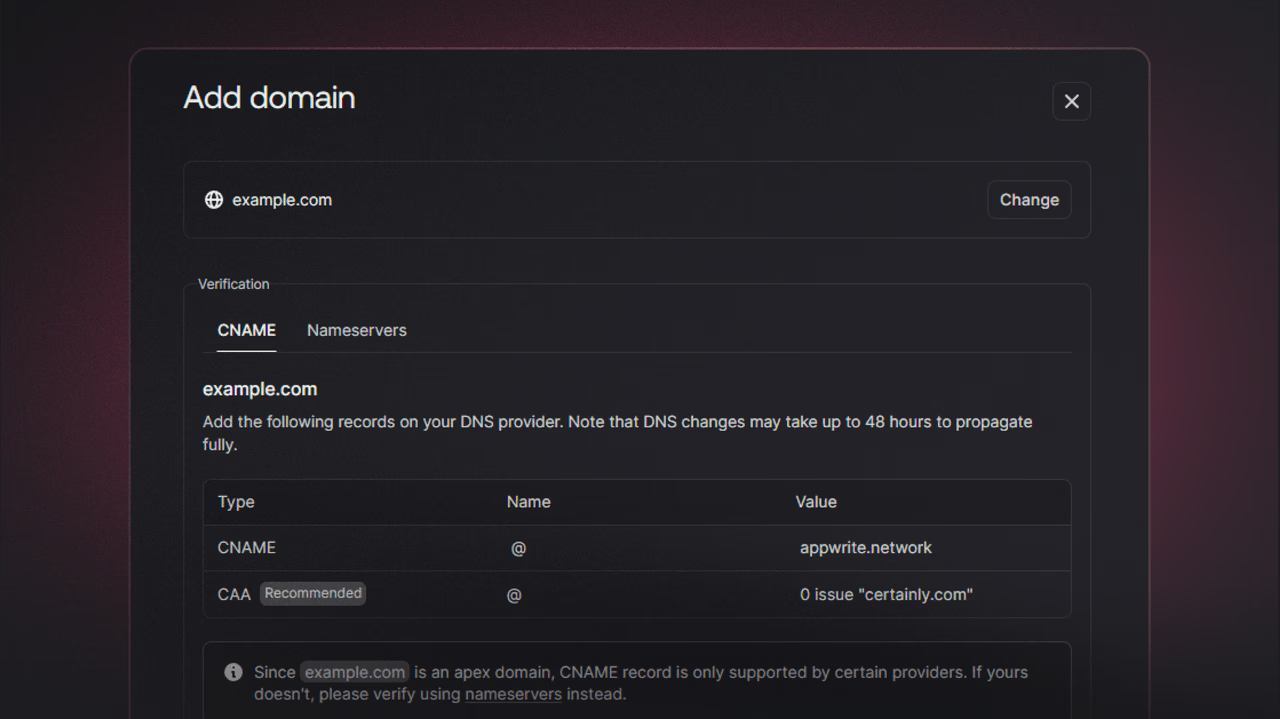
With CNAME flattening support, connecting a custom domain is just a DNS record away. Keep your existing provider, add a CNAME or ALIAS/ANAME record pointing to Appwrite, and verify the domain in the Console. Once DNS propagates, your site is live with SSL automatically configured. DNS propagation can take anywhere from a few minutes to a few hours depending on your provider and TTL settings.
This is especially useful for teams that rely on their DNS provider for more than just domain resolution. You keep DNS-level configuration like MX records and DNS-layer protections with your existing provider, while Appwrite serves your site through its own CDN with SSL, caching, and edge security built in. If you use Cloudflare, set the record to DNS only (grey cloud, not the orange proxy) so traffic reaches Appwrite's CDN directly.
How CNAME flattening works
Standard DNS rules don't allow CNAME records at the root domain (example.com). Only subdomains (www.example.com) can use CNAME. CNAME flattening works around this: your DNS provider accepts a CNAME-like configuration at the root, resolves the target internally, and returns the corresponding IP addresses to the client.
Depending on your provider, this goes by different names. Cloudflare calls it CNAME flattening, Route 53 uses ALIAS records, and some providers support ANAME records. The implementation varies, but the result is the same: your root domain can point to a hostname without breaking DNS standards.
Connect your domain
- Open your site's domains tab in the Appwrite Console.
- Add your custom domain.
- Appwrite provides a CNAME record details.
- Go to your DNS provider and create a DNS record as described by Appwrite. Providers like Cloudflare will handle CNAME flattening at the root automatically. Just make sure the record is set to DNS only (grey cloud), not proxied. On other providers, you may need to use an ALIAS or ANAME record for the root domain.
- Return to Appwrite and verify the domain.
Available now
CNAME flattening support is available today on Appwrite Cloud. Head to your site dashboard, add a custom domain, and follow the updated DNS instructions.
As always, we'd love to hear your feedback. If you run into any issues, join the Appwrite community and let us know.
More resources
CNAME flattening lets you point your root domain (like example.com) to a hostname, which standard DNS rules normally prohibit. Your DNS provider resolves the target internally and returns the corresponding IP addresses to the client. Different providers call it by different names: Cloudflare uses CNAME flattening, Route 53 uses ALIAS records, and others support ANAME records.
No, you no longer need to migrate nameservers. With CNAME flattening support, you can keep your existing DNS provider and just add a CNAME, ALIAS, or ANAME record pointing to Appwrite. Once DNS propagates, your site is live with SSL configured automatically.
DNS standards prohibit CNAME records at the apex (root) domain because they conflict with other required records like SOA and NS. CNAME flattening (or ALIAS/ANAME records) works around this by resolving the target server-side and returning IP addresses instead of a CNAME response. This keeps your DNS RFC-compliant while letting the root domain follow a hostname.
Set the record to DNS only (grey cloud, not the orange proxy) so traffic reaches Appwrite's CDN directly. If you proxy through Cloudflare, you bypass Appwrite's built-in SSL, caching, and edge security, and may run into SSL or routing issues.
Propagation can take anywhere from a few minutes to a few hours depending on your DNS provider and TTL settings. You can check propagation status with tools like dig or online DNS checkers. Once propagation completes, verify the domain in the Appwrite Console to activate SSL.
Yes, Appwrite supports custom domains across the platform, including for your project's API endpoint. The setup process and DNS records vary by product, so check the relevant docs for the specific service you're connecting.









