Announcing origin-bound OTP-Token headers in Appwrite Auth_
Appwrite Auth now adds an OTP-Token header to every email code, so mail clients and password managers can autofill the code on your app's origin only.

Email codes have a copy-paste problem. A user asks your app for a sign-in code, switches to their inbox, finds the email, copies six digits, switches back, and pastes. On a phone, that's two app switches and a trip through the clipboard, and every step is a chance to give up.
The same flow has a security gap. The code in the email isn't tied to anything. If a phishing page on a lookalike domain asks for it, the user types it there just as readily, and an attacker relaying the sign-in in real time gets a session. SMS fixed part of this with origin-bound one-time codes, the @example.com #123456 line that lets a phone offer a code only on the site that sent it. Email had nothing like it.
Today, we are announcing OTP-Token headers on every Appwrite Auth email that carries a one-time code.
What the OTP-Token header gives you
- Machine-readable codes. Each code email includes a header like
OTP-Token: "123456"; origin="https://app.example.com", so software can read the code without parsing the email body. - Codes bound to your origin. A mail client, browser, or password manager that supports the header offers the code on your app's origin and nowhere else.
- Every code email. Email OTP sign-in, email verification and password recovery codes, and MFA email challenges all carry it.
- Safe defaults. Appwrite adds the header only for HTTPS origins and local development hosts, using the origin it has already checked against your project's web platforms.
- Nothing to configure. There is no setting to turn on and no SDK to update. It works with the default SMTP server and with custom SMTP.
- Available everywhere. The header is live on Appwrite Cloud and ships in self-hosted Appwrite 2.7 and later.
How the OTP-Token header works
The header comes from draft-goto-otp-token, an IETF Internet-Draft by Sam Goto and Mike West of Google. It carries the idea behind origin-bound SMS codes over to email. The code and the origin that asked for it go in a header, and the software that hands the code to the user checks that the origins match.
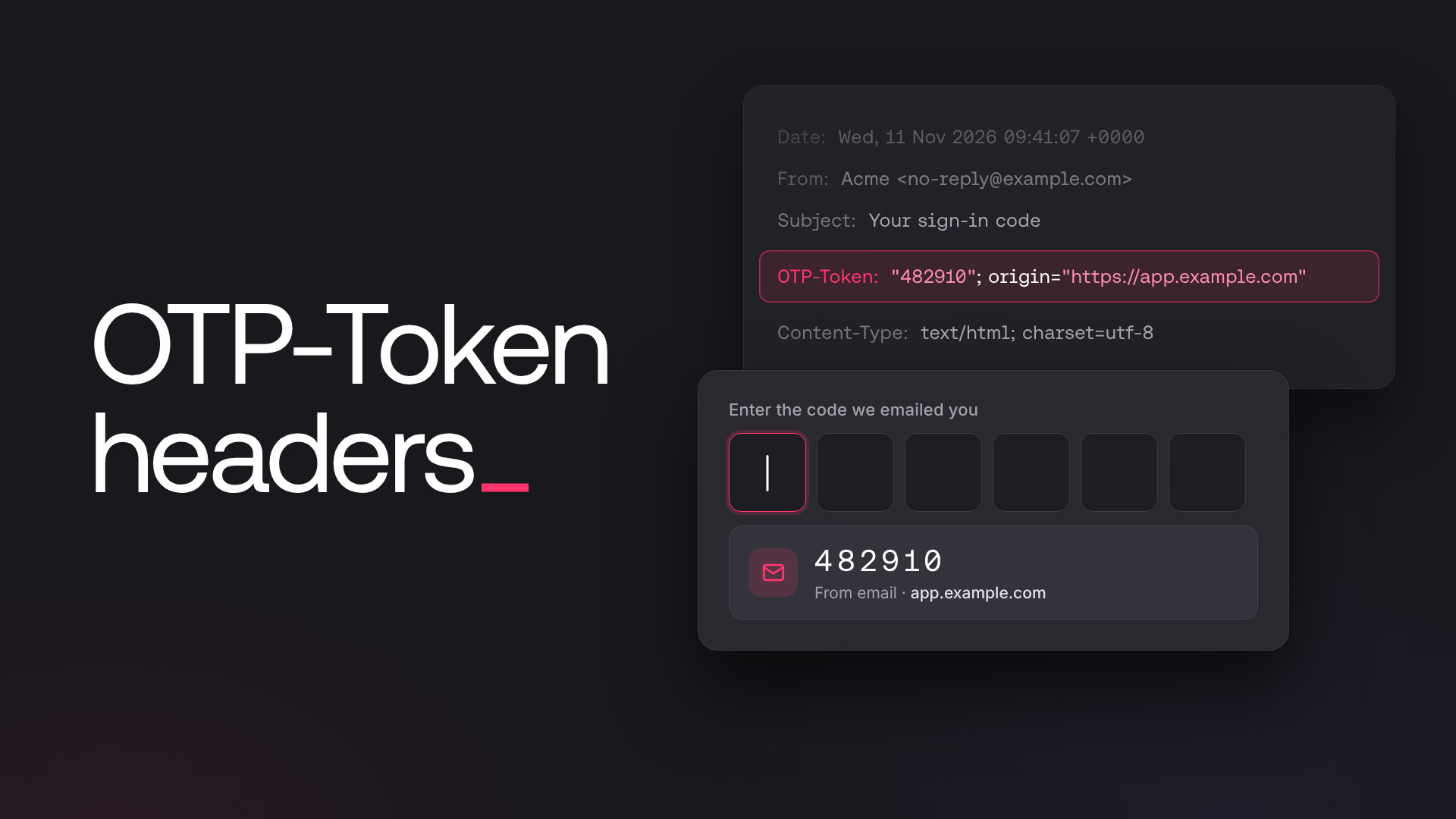
When your web app calls createEmailToken, the browser sends an Origin header with the request. Appwrite has already checked that origin against the web platforms registered in your project, so it uses it for the binding. An email OTP sign-in started from https://app.example.com produces this header:
OTP-Token: "482910"; origin="https://app.example.com"
The value is an RFC 9651 structured field. The code is a quoted string, and the origin follows as a parameter. Appwrite lowercases the origin and drops a default port, because the draft matches origins exactly.
When there's no origin Appwrite can safely bind to, it skips the header and sends the same email as before:
- Server-side calls. Server SDKs and server-side rendered apps don't send an
Origin. - Native apps. Mobile and desktop apps use custom schemes, which aren't web origins.
- Plain HTTP on a public host. The draft only accepts potentially trustworthy origins, so
http://works onlocalhost,*.localhost, and loopback addresses, but not on a public domain. - Origins with extra parts. An origin with a path, query string, credentials, or a non-ASCII hostname isn't a bare origin.
Use OTP-Token headers in your app
There's no new method and no flag. If your web app already sends codes from the browser, your users' code emails already carry the header. Email OTP sign-in is the same two calls as before:
import { Client, Account, ID } from 'appwrite';

const client = new Client()
    .setEndpoint('https://<REGION>.cloud.appwrite.io/v1')
    .setProject('<PROJECT_ID>');

const account = new Account(client);

// The email carries an OTP-Token header bound to this page's origin
const token = await account.createEmailToken({
    userId: ID.unique(),
    email: 'user@example.com'
});

// Later, with the code the user typed or autofilled
const session = await account.createSession({
    userId: token.userId,
    secret: '<CODE>'
});
The one change worth making is on the input. Mark it with autocomplete="one-time-code" so browsers and password managers know where a one-time code belongs:
<input type="text" inputmode="numeric" autocomplete="one-time-code" maxlength="6" />
The same goes for createEmailVerificationOTP, createRecoveryOTP, and createMfaChallenge with the email factor. The Code autofill docs list the rules for each flow.
If you send email through a custom SMTP provider, send yourself a code and look at the received headers. Some providers rewrite or encode custom headers when they relay a message, and an encoded OTP-Token header can't be parsed.
Where autofill support stands
Support for the header is early. The draft is an individual Internet-Draft that no IETF working group has adopted yet, and its name and parameters could still change. Mail clients, browsers, and password managers will add support on their own schedules.
Sending the header now costs nothing. The code is already in the email body, so the header reveals nothing new to anyone who can read the message. When your users' software starts reading OTP-Token, autofill works in your app without a release on your side. And because Appwrite builds the header on the server, following a change in the draft won't need a change in your app either.
When to rely on email codes
The header makes email codes quicker to enter and harder to phish through autofill. It doesn't make them phishing-proof. A user who reads the code and types it into a lookalike site by hand is still exposed, and the draft itself recommends phishing-resistant methods where you can use them.
Email codes with OTP-Token headers fit passwordless sign-in where email is the account identifier, email verification and password recovery inside your app, and a second factor for users who haven't set up an authenticator app. When you need sign-in that can't be phished, offer passkeys and keep email codes as the fallback for devices without one.
Getting started with email code autofill in Appwrite Auth
Email OTP sign-in, verification codes, recovery codes, and MFA email challenges carry the OTP-Token header today on Appwrite Cloud and in self-hosted Appwrite 2.7 and later. Add autocomplete="one-time-code" to your code inputs, and your app is ready for autofill as soon as your users' mail clients and password managers support it.
OTP-Token is an email header that carries a one-time code together with the origin that requested it, for example OTP-Token: "123456"; origin="https://app.example.com". It is defined in the IETF Internet-Draft draft-goto-otp-token. Mail clients, browsers, and password managers that support it can autofill the code on that origin and nowhere else.
Email OTP sign-in (createEmailToken), email verification codes (createEmailVerificationOTP), password recovery codes (createRecoveryOTP), and MFA email challenges (createMfaChallenge with the email factor). Magic URL emails and link-based verification and recovery emails carry no code, so they don't include it.
Appwrite adds the header only when the request that sent the code has a usable browser origin: HTTPS, or HTTP on localhost or a loopback address, with no path or query string. Server SDKs and server-side rendered apps send no Origin, and native apps use custom schemes, so their emails don't include it. If you relay email through a custom SMTP provider, also check that the provider doesn't rewrite custom headers. See Code autofill.
No. Appwrite adds the header on the server, with no setting to enable and no SDK update. The one change worth making is to mark your code input with autocomplete="one-time-code", so browsers and password managers know where the code belongs.
Support is early. The header comes from an individual Internet-Draft published in September 2026 that an IETF working group hasn't adopted yet. Appwrite sends it now, so autofill works in your app as soon as your users' software reads it.
It lowers the risk, because autofill only offers the code on the origin that asked for it. A user can still read the code and type it into a phishing site by hand. For sign-in that can't be phished, use passkeys and keep email codes as a fallback.
Yes, from Appwrite 2.7. Follow the upgrade guide to update your instance.