Announcing automatic image formats based on browser support_
Set output to auto on Appwrite Storage previews and Avatars screenshots, and every browser gets AVIF, WebP, or the original format from the same image URL.

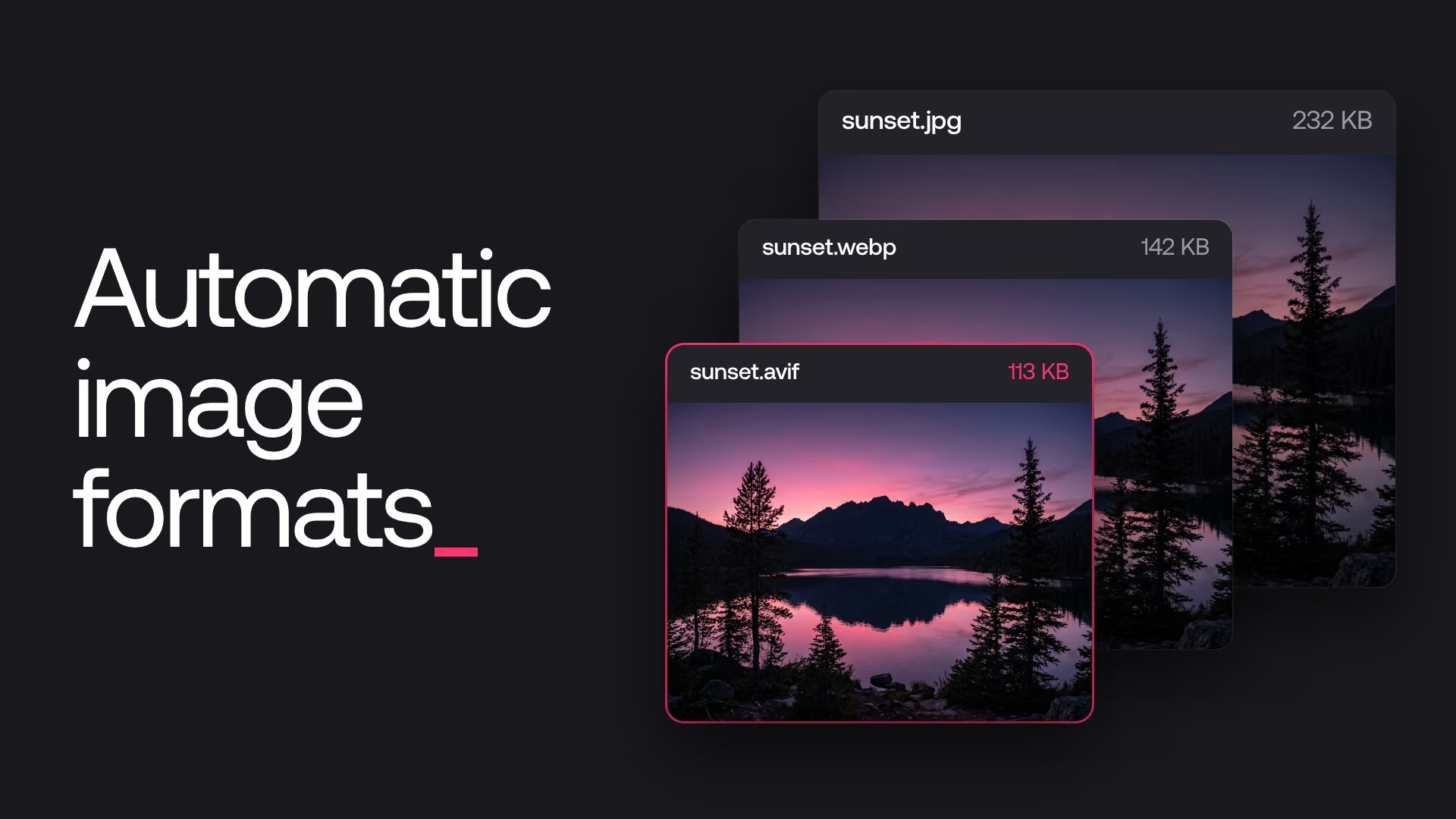
AVIF files are often much smaller than JPEGs of the same quality, and WebP sits in between. Appwrite Storage previews can already output AVIF. The catch is that a preview URL set to AVIF serves AVIF to every client, including the ones that can't decode it. So most apps settle for one format that works everywhere and leave the savings on the table.
The standard workaround is a picture element with one source per format, which means building two or three preview URLs for every image and keeping them in sync. Add responsive widths to that, and each image turns into a small grid of URLs.
Today, we are announcing automatic output format for Appwrite Storage previews and Avatars screenshots.
What automatic output format gives you
- One URL, the best format per browser. Set
outputtoauto, and Appwrite returns AVIF, WebP, or the original format based on the request'sAcceptheader. - No
<picture>boilerplate. One plain<img>does the job of a<picture>element with a URL per format. - Cached once per format. Appwrite renders each format once and reuses it, and CDNs never mix up formats between visitors.
- No extra cost. Every format of a file counts as one origin image.
How Appwrite picks the format
When output is auto, Appwrite reads the request's Accept header and takes the first match:
- AVIF, if the header lists
image/avif. - WebP, if the header lists
image/webp. - Otherwise, the format you'd get without
output: the original format for previews, or PNG for screenshots.
A generic image/* doesn't say which formats a client supports, so it gets the original format.
Browsers send an Accept header that lists the image formats they decode. Based on MDN's list of default Accept values, this is what a preview with output=auto returns today:
| Client | Accept lists | Format returned |
|---|---|---|
| Chrome, Edge, Firefox | image/avif, image/webp | AVIF |
| Safari | image/webp | WebP |
| Appwrite SDKs that download bytes | image/* | Original format |
fetch() without an Accept header | */* | Original format |
Serve AVIF and WebP from one preview URL
In the Web SDK, getFilePreview() returns a URL, so the browser that loads it picks the format. Pass ImageFormat.Auto:
import { Client, Storage, ImageFormat } from "appwrite";

const client = new Client()
    .setEndpoint('https://<REGION>.cloud.appwrite.io/v1')
    .setProject('<PROJECT_ID>');

const storage = new Storage(client);

export function Photo({ fileId, alt }) {
    const src = storage.getFilePreview({
        bucketId: 'photos',
        fileId,
        width: 800,
        output: ImageFormat.Auto
    });

    return <img src={src} alt={alt} />;
}
Without an SDK, add output=auto to the preview URL. One <img> replaces a <picture> element with a separate URL per format:
<img alt="Sunset over the bay"
  src="https://<REGION>.cloud.appwrite.io/v1/storage/buckets/photos/files/sunset/preview?project=<PROJECT_ID>&width=800&output=auto" />
avatars.getScreenshot() accepts ImageFormat.Auto the same way. Screenshots fall back to PNG when the browser lists neither AVIF nor WebP.
How caching works
Browsers cache each format they receive, but CDNs don't cache auto responses, so one visitor never gets another visitor's format. Appwrite renders each format once and reuses it for every later request.
If you need a CDN in front of your previews, use a fixed format for those URLs.
When to use output=auto
Reach for auto whenever a browser loads the image directly:
- User uploads in web apps. Avatars, product photos, and galleries rendered with
<img>get smaller without any client-side format detection. - Server-rendered and static sites. Pages that embed preview URLs in HTML get per-browser formats from a single attribute.
- Link previews. Screenshots of shared links load faster in feeds and cards.
Skip it when the client downloads bytes itself. The Flutter, Apple, Android, and React Native SDKs, and the server SDKs, send Accept: image/*, so auto returns the original format. In native apps, pass the format your platform decodes. The same goes for pipelines that expect one fixed format, such as a job that always processes JPEGs.
Getting started with automatic image formats in Appwrite Storage
Automatic output format is live on Appwrite Cloud today. Set output to auto on your web previews, and every visitor gets the smallest format their browser supports. We'd love to hear what you build with it on Discord.
Set the output parameter of a file preview to auto, or pass ImageFormat.Auto to storage.getFilePreview() in the Web SDK. Appwrite reads the request's Accept header and returns AVIF if it lists image/avif, WebP if it lists image/webp, and the original format otherwise. See automatic output format.
Browsers list the image formats they support in the Accept header. Appwrite returns AVIF if the browser lists it, WebP if it lists WebP, and the original format otherwise.
Those SDKs download preview bytes with Accept: image/*, which names no specific format, so auto falls back to the original format. auto is built for URLs a browser loads as an image, such as the URL the Web SDK's getFilePreview() returns. In other clients, pass an explicit format such as webp.
No. Browsers cache them, but CDNs don't, so one visitor never gets another visitor's format. If you need a CDN in front of your previews, use a fixed format for those URLs.
No. Image transformations are billed per origin image, not per variant, so AVIF, WebP, and the original format of the same file count as one origin image.
Storage file previews (storage.getFilePreview) and Avatars screenshots (avatars.getScreenshot). Screenshots fall back to PNG instead of the original format.