Secure sensitive database fields with encrypted text columns_
Learn how to use encrypted text columns to protect sensitive data in your Appwrite database.

Modern applications often rely on personal, identifying, or internal data to function. Whether it is a user's name, a support message, or a private note added by an administrator, certain fields carry weight beyond their technical type.
In Appwrite, these fields can now be stored with encryption at rest by using encrypted text columns. This feature allows developers to protect data inside their database without requiring complex encryption logic on the client side. It is not end-to-end encryption, and it does not prevent project owners from reading data. However, it introduces a meaningful boundary between sensitive values and the infrastructure that holds them.
This guide introduces encrypted text columns, explains how they function, where they are appropriate, and what limitations they carry.
A protection layer for sensitive data
When a text column is marked as encrypted, Appwrite applies AES-128 encryption in Galois/Counter Mode (GCM) before writing it to the database. This means the data is never stored in plaintext at rest. It remains protected even in the case of unauthorized access to the underlying database. For many applications, that separation between what is readable in production and what is stored in the backend is enough to reduce risk and support stronger privacy standards.
Using encrypted columns in the Console
Encrypted text columns can be created or edited through the Appwrite Console.
To create an encrypted column:
Open your Appwrite Console
Navigate to Databases and select your database
Choose a table and open the Columns tab
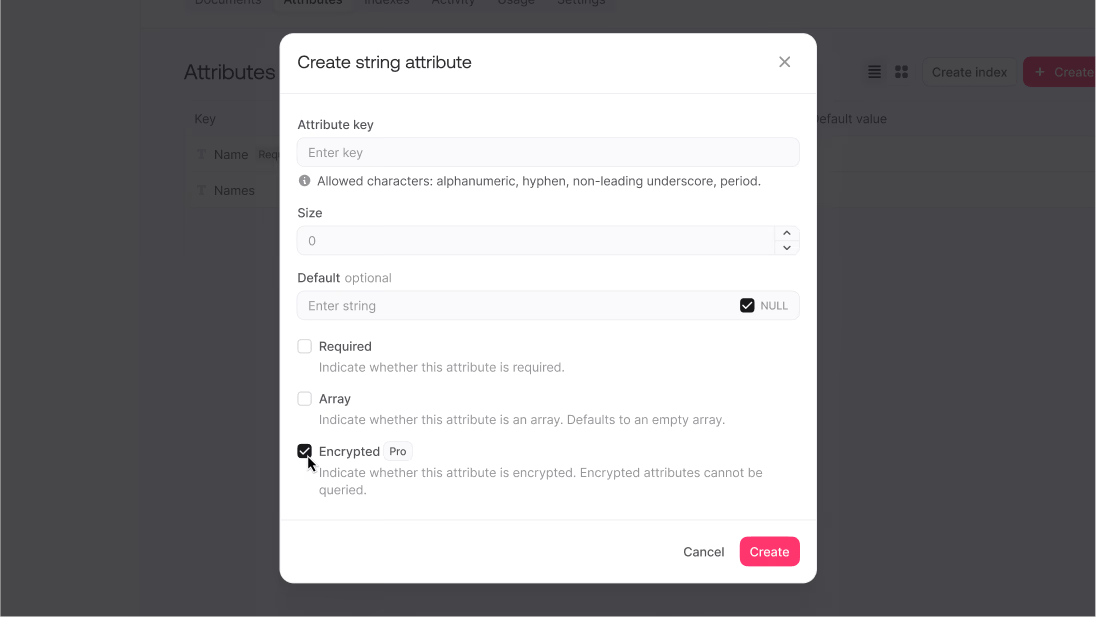
Create a text column
In the column creation modal, enable the Encrypted checkbox
You may also configure standard settings, such as default values, whether the field is required, or whether it supports arrays.
Once created, the column will appear in your schema with a lock icon indicating that its contents are encrypted at rest.
Note that encrypted text columns are available only on Pro plans and higher.
What encryption changes, and what it does not
Encryption changes how Appwrite stores a value, but it does not change how that value is accessed within the Console. Project owners and team members with sufficient access will still be able to read encrypted column values in plaintext. Encryption applies only to how the data is written to disk.
Most importantly, encrypted columns cannot be queried. You cannot filter, search, or sort based on encrypted values.
When encryption fits
Encrypted columns are most suitable for data that must be stored, but not queried through client applications. This may include:
- Personally identifiable information, such as government-issued IDs, full legal names, or birth dates
- Private internal data, such as administrator notes, moderation logs, or internal support messages
- Sensitive metadata, including IP addresses, request contexts, or system diagnostics
- Free-form user inputs, such as complaint text, optional comments, or custom configuration fields
These are values that carry risk if stored openly, but which rarely need to be queried. In many applications, such fields accumulate gradually in the background. They are often forgotten, even though they hold meaningful traces of identity and trust. Encrypting them protects against exposures.
Encryption is not appropriate for fields that you need to filter or search. For example, a product category field should remain unencrypted if you need to filter products by category. A practical approach could be to pair an unencrypted, queryable label with a separate encrypted field that holds more sensitive information.
Why this is not end-to-end encryption
End-to-end encryption ensures that only the sender and intended recipient can read the data. In such systems, even the server has no ability to decrypt the message. Appwrite's encrypted columns are intended for situations where data must remain accessible within the system, but should not be stored in plaintext at rest.
If you are building applications where zero-knowledge privacy is required, such as secure messaging, personal vaults, or encrypted note sharing, you will still need to manage encryption manually on the client side. In these scenarios, the server should never receive unencrypted data.
Compliance and responsibility
Encrypted columns support stronger privacy practices, but they do not guarantee compliance. If your application operates under frameworks such as GDPR, HIPAA, CCPA, or internal data security guidelines, storing sensitive data encrypted at rest is often considered a foundational requirement. This feature makes it easier to meet that requirement without restructuring your entire application.
Still, encryption must be paired with other controls. Who can access the data is just as important as how it is stored. If administrators or engineers can read encrypted fields in the Console without restriction, the protection is partial. Role-based access, logging, and appropriate review practices are still necessary.
Before you enable encryption
Once a column is marked as encrypted, that decision cannot be reversed. You cannot decrypt the field, change it back to plaintext, or modify its query behavior. For this reason, it is important to consider the implications before enabling encryption.
Ask yourself:
- Will I ever need to filter or sort by this field?
- Should this value be visible in the client application, or only within the Console?
- Who inside my project will have access to the plaintext version of this data?
- Is this field storing information that carries legal, ethical, or reputational risk?
If you are unsure, it is better to begin with unencrypted fields and migrate later once your needs are clearer
Wrapping up
Appwrite's encrypted text columns provide a meaningful layer of protection for sensitive data at rest. They offer a thoughtful approach to data security that allows you to separate what should be searchable from what should simply be safe. While they're designed to work within your project's access structure rather than replacing end-to-end encryption for communication, they deliver exactly what many applications need: secure storage without complexity.