Redirect a site for maintenance_
Create Appwrite Firewall rules that send visitors of a site to a maintenance page and back.
2 min read
A redirect rule sends matching visitors to another location. Use it to put a deployed site into maintenance without a new deployment.
This guide uses two rules on one site. A bypass rule keeps the maintenance page itself reachable. A redirect rule sends every other path to the maintenance page. Without the bypass rule, requests to the maintenance page would match the redirect rule and loop.
The redirect rule also catches the CSS, JavaScript, fonts, and images your maintenance page loads, so the page renders unstyled.
Serve a maintenance page with inline styles and no external assets, or add a bypass rule for each asset path at a lower priority number than the redirect.
Create the bypass rule
- Open Firewall in your project.
- Click Create rule.
- Enter a Rule name (for example
Allow maintenance page). - Set Resource type to Sites and select your site.
- Under conditions, set Path Equals
/maintenance. - Under Then, choose Bypass.
- Set Priority to
10. - Click Create rule.
Create the redirect rule
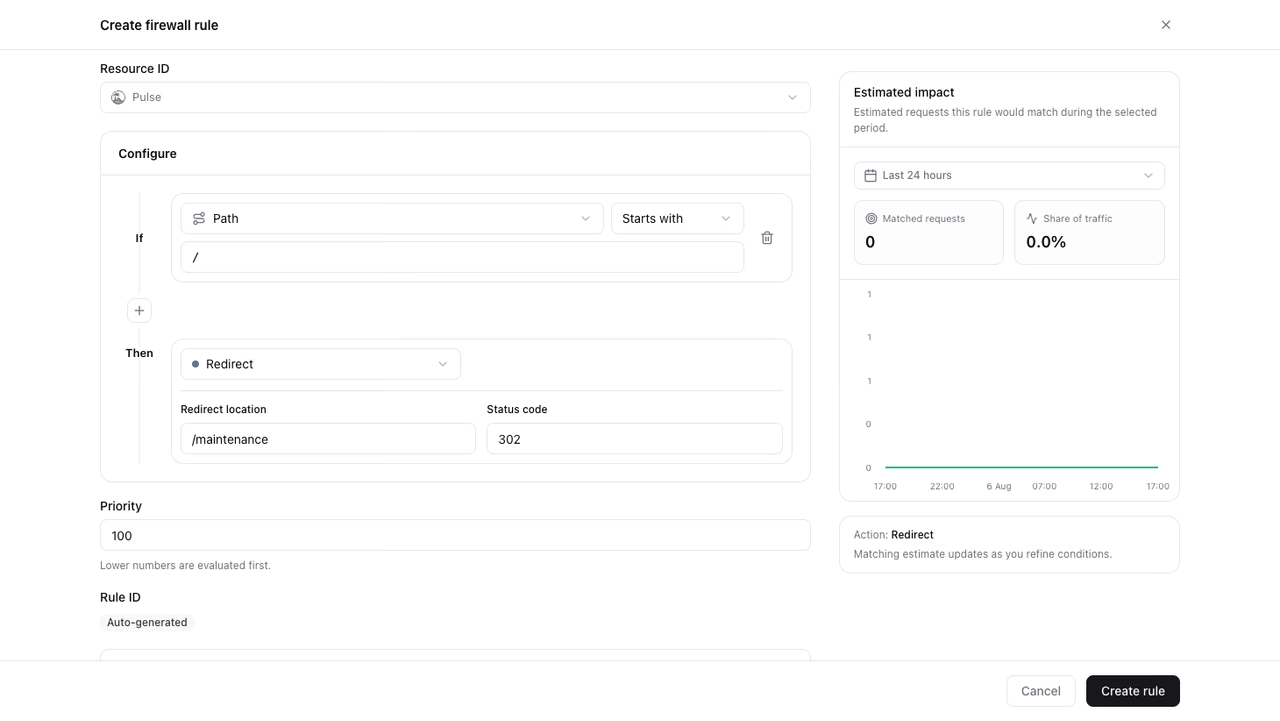
- Click Create rule again.
- Enter a Rule name (for example
Redirect to maintenance page). - Set Resource type to Sites and select the same site.
- Under conditions, set Path Starts with
/. - Under Then, choose Redirect.
- Set Redirect location to
/maintenance. - Keep Status code at
302. - Set Priority to
100. - Click Create rule.
Use 302 so browsers and search engines do not cache the redirect.
Verify the rules
- Open any path of the site in a browser. Confirm the browser lands on
/maintenance. - Open
/maintenancedirectly. Confirm that the page loads without a redirect and renders with its styles. - Open Firewall and confirm the Redirected series rises in the traffic overview.
End the maintenance
- Open Firewall and select the site in the resource selector.
- Turn off the status toggle of the redirect rule.
The site serves normal traffic again. Keep the disabled rule for the next maintenance window, or delete it.
Was this page helpful?
Share what worked or what we should fix. Once approved, our agents automatically apply suggested updates to the docs.