Rules_
Learn what Appwrite Firewall rules contain, how enabled state works, and how plan limits apply.
3 min read
A Firewall rule is a named policy that matches inbound requests and applies an action. Rules belong to a project. You manage them under Firewall in your project.
What a rule contains
| Field | Purpose |
|---|---|
| Name | Label shown in the rules list |
| Description | Optional notes for your team |
| Resource type | API, Functions, or Sites |
| Resource ID | Required for Functions and Sites scopes |
| Conditions | Request filters. A rule with none matches every request in its scope |
| Action | Deny, bypass, challenge, rate limit, or redirect (set at create time) |
| Priority | Evaluation order (lower first), -100000 to 100000 |
| Enabled | Whether the rule is evaluated. Disabled rules are kept and count toward plan limits |
| Rule ID | Set once, when the rule is created. The Console generates one for you |
Each action has its own settings, covered in Actions.
The name holds up to 128 characters, and the description holds up to 1024.
Console layout
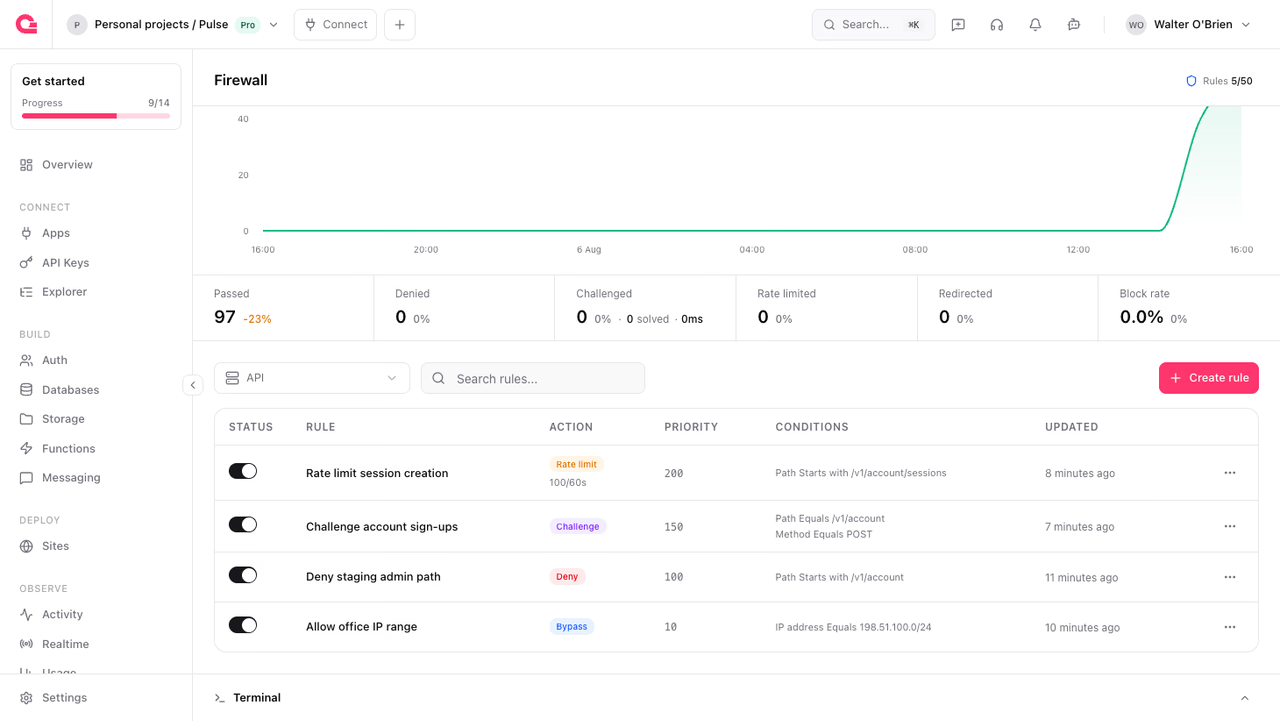
Use the resource selector above the list to filter by API, function, or site. See Resource scopes.
Each row shows the rule's status toggle, name, action, priority, conditions, and last update. Use the status toggle to enable or disable a rule directly from the list, or open the row's actions menu to update or delete it.
When a site is selected, the rules toolbar includes Attack mode. Turning it on creates a challenge rule named Attack mode that matches every request, or re-enables the one that already exists. See Attack mode.
API endpoints
Each action has its own endpoint: /v1/waf/rules/deny, /bypass, /challenge, /rate-limit, and /redirect.
curl -X POST https://cloud.appwrite.io/v1/waf/rules/deny \ -H "Content-Type: application/json" \ -H "X-Appwrite-Project: <PROJECT_ID>" \ -H "X-Appwrite-Key: <API_KEY>" \ -d '{ "ruleId": "unique()", "name": "Block a country", "resourceType": "api", "priority": 100, "enabled": true, "conditions": [ { "method": "equal", "attribute": "country", "values": ["RU"] } ] }'Each condition takes a method, an attribute, and a list of values. Operators that take no value, such as isNull, still need values as an empty list. Conditions lists the attribute names.
A request without conditions creates a rule that matches every request in its scope. An empty conditions array returns a 400.
Plan limits
Firewall rule limits are per project and depend on your organization plan:
| Plan | Rules per project |
|---|---|
| Free (Starter) | 2 |
| Pro | 50 |
| Scale | 50 |
When you reach the limit, you cannot create a rule until you delete one or upgrade your plan. Delete a rule from its actions menu in the rules list. Disabled rules count toward the same limit.
The Console shows current usage next to the Firewall title when a limit applies.
Who can manage rules
Firewall API scopes are wafRules.read and wafRules.write. On Appwrite Cloud with organization roles enabled, the owner and developer roles hold both scopes and can create, update, and delete rules. The analyst and editor roles hold only wafRules.read, so they can view rules without changing them. The billing role holds neither.
When organization roles are disabled, all organization members can manage rules.
Was this page helpful?
Share what worked or what we should fix. Once approved, our agents automatically apply suggested updates to the docs.