Block traffic by country_
Create Appwrite Firewall deny rules that block project API traffic from specific countries.
2 min read
A deny rule with a country condition blocks all matching traffic from that country. Use this pattern to comply with regional restrictions or to stop abuse that comes from one region.
Country conditions use the geo location of the client IP address, and work on every plan. Finer location attributes such as city need the premium Geo DB addon.
Create the deny rule
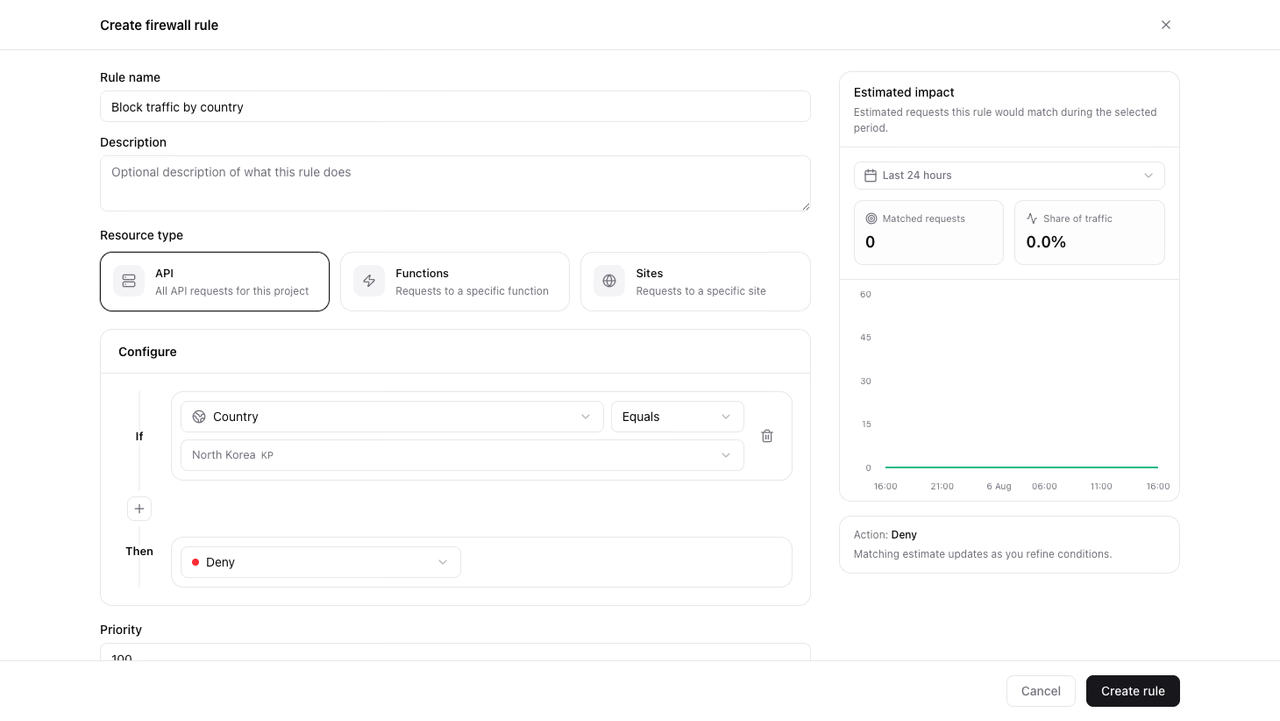
- Open Firewall in your project.
- Click Create rule.
- Enter a Rule name (for example
Block traffic by country). - Keep Resource type set to API.
- Under conditions, set the attribute to Country.
- Keep the operator set to Equals.
- Select the country in the country picker.
- Under Then, choose Deny.
- Keep Priority at
100. - Review the impact preview, then click Create rule.
Denied clients receive a 403 response. The denied requests appear in traffic overview under the Denied series.
To block more than one country, create one deny rule for each. Conditions on a single rule must all match, and a request comes from one country, so a rule with two Country Equals conditions never matches anything.
Allow only specific countries
To serve only specific countries, invert the pattern. Create one deny rule, and add one Country Not equal condition for each allowed country. A request matches the rule only when its country differs from every allowed country, and the rule denies it.
Traffic whose country Appwrite cannot resolve also matches Not equal, so this rule denies it. To let it through, add Country Not equal unresolved. See When Appwrite cannot resolve a location.
Verify the rule
- Send a request from the blocked country with a client SDK or an API key. Use one of those, because Firewall never blocks the Console.
- Confirm the client receives a
403response. - Open Firewall and confirm the Denied series rises in the traffic overview.
To pause the rule, turn off its status toggle in the rules list.
Was this page helpful?
Share what worked or what we should fix. Once approved, our agents automatically apply suggested updates to the docs.