Rate limit authentication traffic_
Create an Appwrite Firewall rate limit rule that slows brute-force attempts on authentication paths.
2 min read
A rate limit rule sets a request quota for matching traffic. Use it on authentication paths to slow brute-force attacks without blocking normal users.
This guide limits session creation. Each client IP address can send 10 matching requests per 60 seconds. Requests over the quota receive a 429 response with a Retry-After header.
You cannot change a rule's strategy after you create it. This guide uses Fixed window. Read Rate limit strategies first if you want another.
Create the rate limit rule
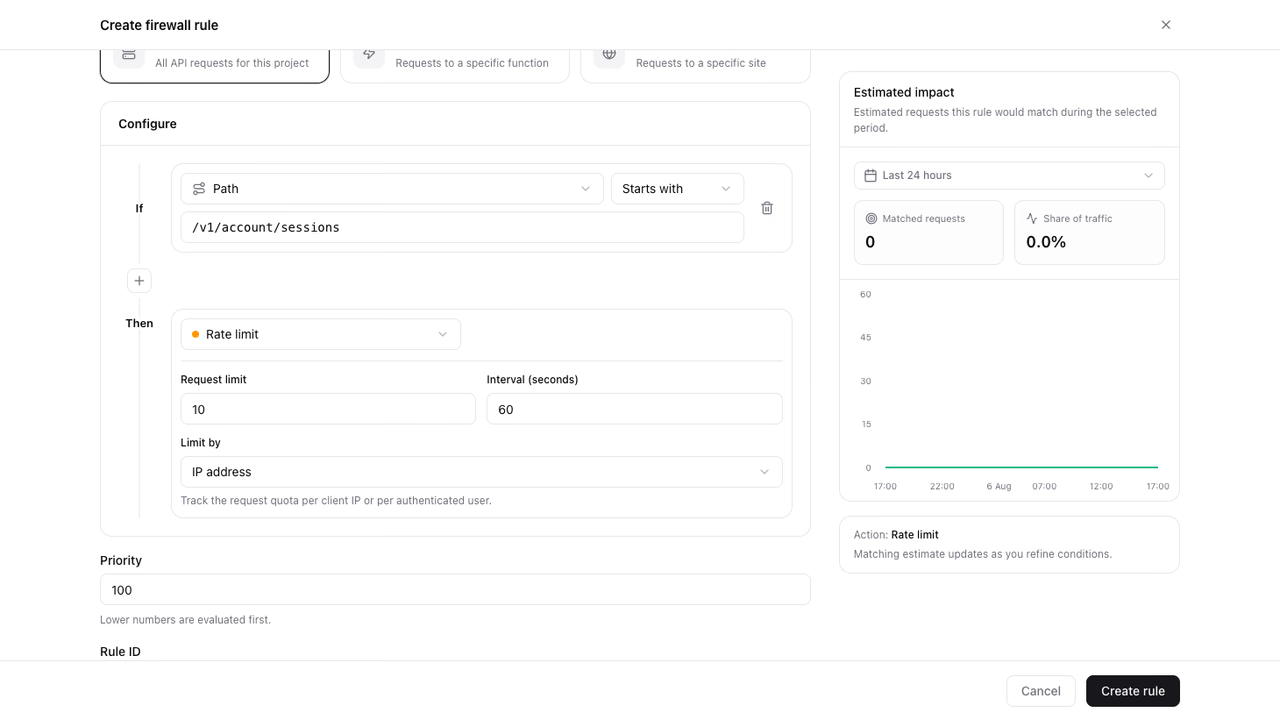
- Open Firewall in your project.
- Click Create rule.
- Enter a Rule name (for example
Rate limit sign-in attempts). - Keep Resource type set to API.
- Under conditions, set Path Starts with
/v1/account/sessions. - Add a second condition: Method Equals
POST. - Under Then, choose Rate limit.
- Set Request limit to
10. - Keep Interval (seconds) at
60. - Keep Strategy at Fixed window.
- Keep Limit by set to IP address.
- Review the impact preview, then click Create rule.
The path prefix on its own also covers listing and deleting sessions, so the Method condition keeps the quota on session creation. Without it, signing out counts against the same quota.
Choose the quota
Size the quota against the traffic you see in the impact preview. A quota below normal client behavior creates false positives. A quota far above attack speed gives no protection.
Fixed window resets the count at each interval boundary, so Retry-After tells a throttled client exactly how long to wait.
Set Limit by to User ID to count per signed-in user instead of per IP address. Signed-out requests then skip the rule.
Verify the rule
- Send more than
10matching requests in one minute with a client SDK or an API key. - Confirm the requests over the quota receive a
429response with aRetry-Afterheader. - Open Firewall and confirm the Rate limited series rises in the traffic overview.
Was this page helpful?
Share what worked or what we should fix. Once approved, our agents automatically apply suggested updates to the docs.