Allowlist trusted IP addresses_
Pair an Appwrite Firewall bypass rule with a deny rule so only trusted IP addresses reach a protected path.
2 min read
An allowlist uses two rules. A bypass rule with a low priority number lets trusted traffic through. A deny rule with a higher priority number blocks all other traffic to the same path.
The pair works because of priority. Appwrite evaluates rules with lower priority numbers first. A matching bypass rule stops evaluation, so the deny rule never runs for trusted traffic.
Create the bypass rule
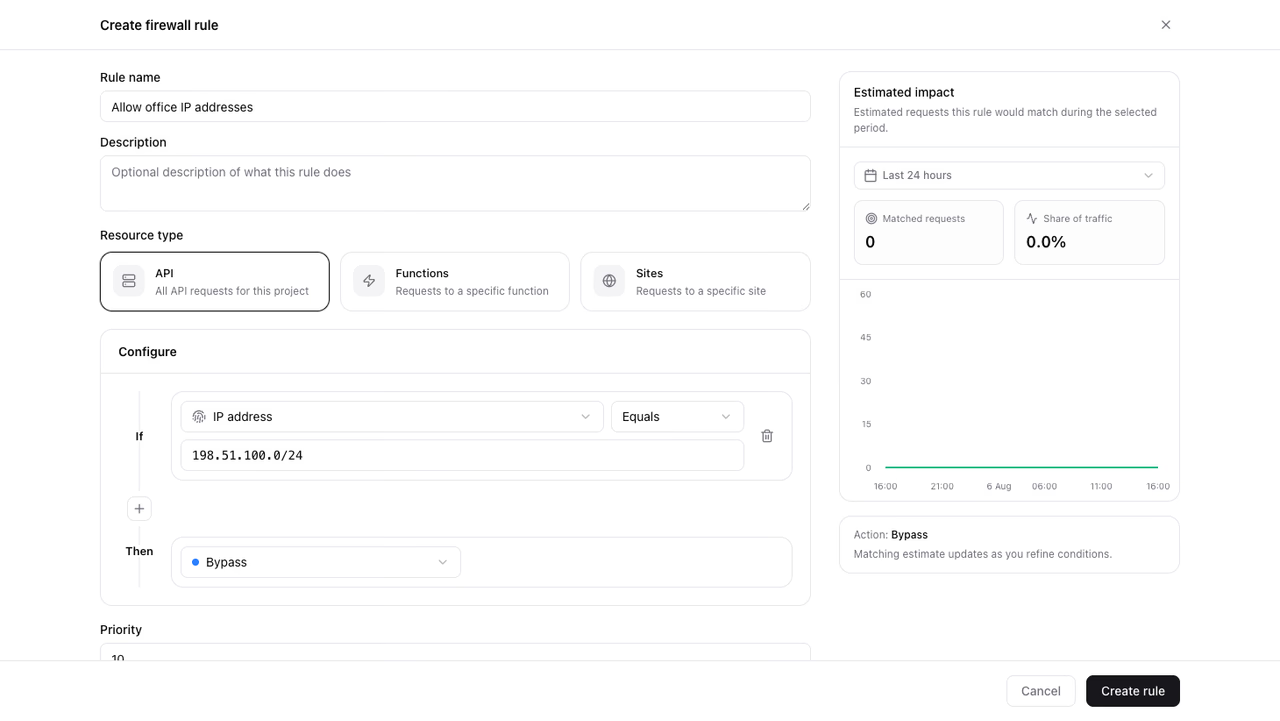
- Open Firewall in your project.
- Click Create rule.
- Enter a Rule name (for example
Allow office IP addresses). - Keep Resource type set to API.
- Under conditions, set the attribute to IP address.
- Keep the operator set to Equals.
- Enter a single IP address (
203.0.113.10) or a CIDR range (198.51.100.0/24). - Under Then, choose Bypass.
- Set Priority to
10. - Click Create rule.
The impact preview compares IP addresses as text, so a CIDR range shows zero matches. The rule still matches every address in the range.
To protect one path only, add a second condition to the same rule. For example, add Path Starts with /v1/users. Both conditions must match for the bypass to apply.
Create the deny rule
- Click Create rule again.
- Enter a Rule name (for example
Deny all other traffic). - Keep Resource type set to API.
- Add the same path condition as the bypass rule, or use Path Starts with
/v1for the whole API. - Under Then, choose Deny.
- Set Priority to
100. - Review the impact preview, then click Create rule.
The impact preview shows how much recent traffic the deny rule would match. If the count is higher than you expect, tighten the path condition.
Verify the rules
- Send a request from a trusted IP address with a client SDK or an API key. Confirm the request succeeds.
- Send a request from a different IP address. Confirm the client receives a
403response. - Open Firewall and confirm the Denied series rises in the traffic overview. Bypassed requests count under Passed.
Was this page helpful?
Share what worked or what we should fix. Once approved, our agents automatically apply suggested updates to the docs.