Scaling_
Resize the compute specification of your PostgreSQL database with zero downtime and grow storage automatically as your data grows.
3 min read
Native databases scale in two dimensions: the compute specification (CPU, memory, and connection limit) and storage. Both can change after creation, without dump-and-restore migrations.
List available specifications
Each database runs against a specification that defines its CPU, memory, included storage, and maximum connections. Listing specifications returns the whole catalogue, with an enabled flag showing which ones your plan allows:
import { Client, Postgresql } from 'node-appwrite';
const client = new Client()    .setEndpoint('https://<REGION>.cloud.appwrite.io/v1')    .setProject('<PROJECT_ID>')    .setKey('<YOUR_API_KEY>');
const postgresql = new Postgresql(client);
const specifications = await postgresql.listSpecifications({
});
Change the compute specification
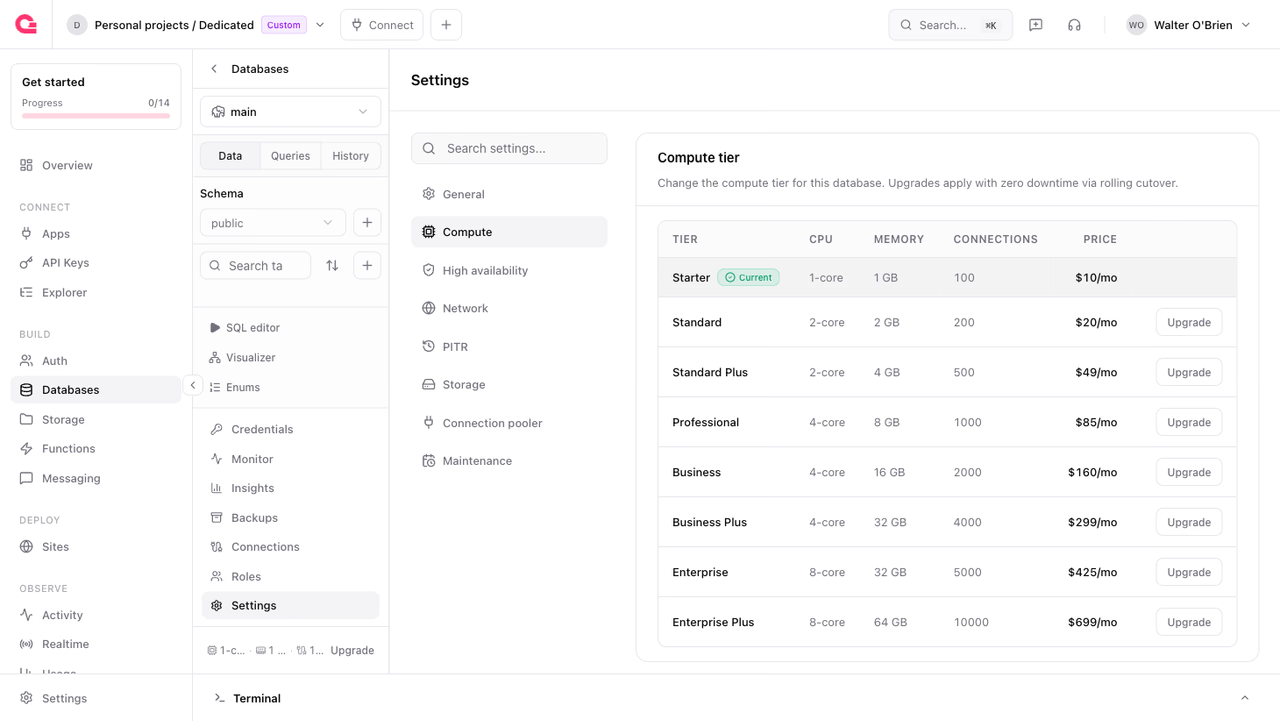
To resize in the Console, open your database, go to Settings > Compute, and pick a larger specification. The Console offers upgrades only.
From the API, pass the new specification ID:
import { Client, Postgresql } from 'node-appwrite';
const client = new Client()    .setEndpoint('https://<REGION>.cloud.appwrite.io/v1')    .setProject('<PROJECT_ID>')    .setKey('<YOUR_API_KEY>');
const postgresql = new Postgresql(client);
await postgresql.update({    databaseId: '<DATABASE_ID>',    specification: '<SPECIFICATION>',});
Resizes apply with zero downtime and the database keeps its storage in place. When the new size fits on the current node, the resize applies to the running instance without a restart. When it needs a larger node, the database fails over onto an instance of the target size and writes pause briefly at the cutover. The database status shows scaling while the resize is in progress.
You cannot move a database to a smaller specification. Every specification in the catalogue includes more storage than the one below it, and a resize is rejected when the target includes less storage than the database currently has.
Storage
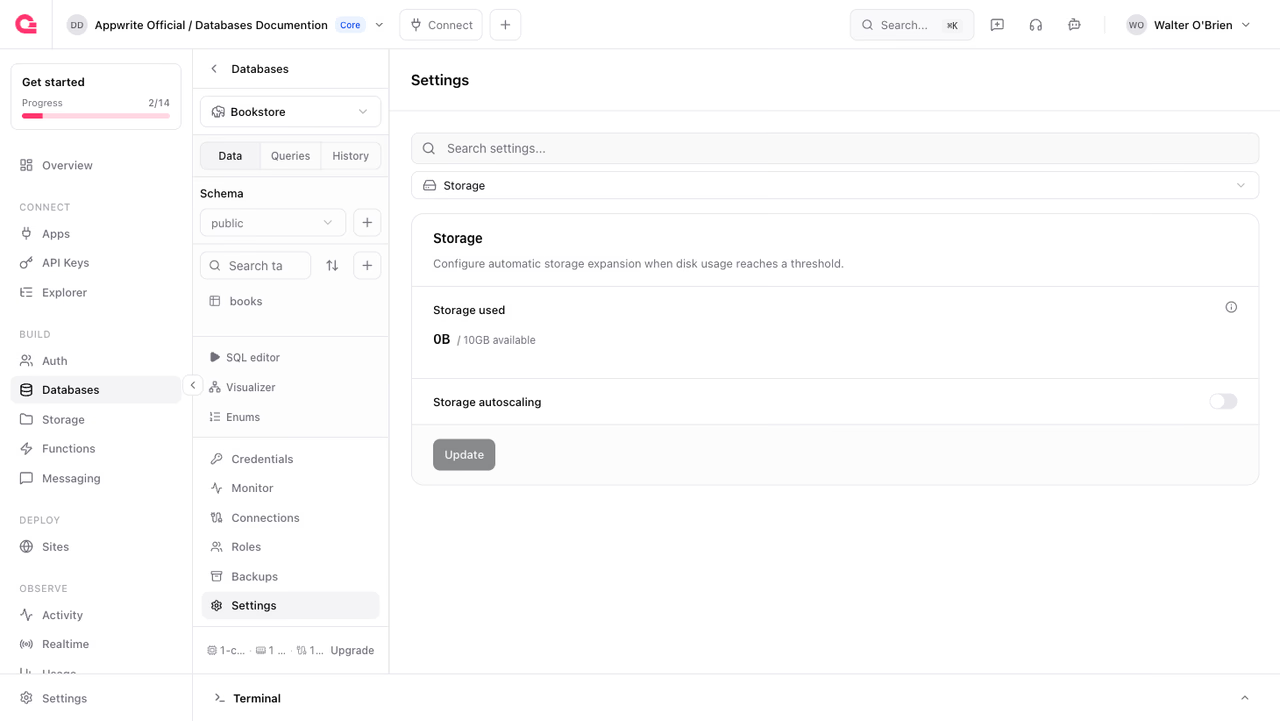
Each specification includes a storage allowance, and storage beyond the allowance is billed per GB. Storage only grows; you cannot shrink a database's storage after it has expanded. To reclaim a smaller footprint, create a second database and restore a backup into it.
Storage autoscaling
With storage autoscaling enabled, Appwrite grows the storage automatically when usage crosses a threshold. Configure it under Settings > Storage in the Console, or through the API:
import { Client, Postgresql } from 'node-appwrite';
const client = new Client()    .setEndpoint('https://<REGION>.cloud.appwrite.io/v1')    .setProject('<PROJECT_ID>')    .setKey('<YOUR_API_KEY>');
const postgresql = new Postgresql(client);
await postgresql.update({ databaseId: '<DATABASE_ID>', storageAutoscaling: true, storageAutoscalingThresholdPercent: 85, storageAutoscalingMaxGb: 500,});| Parameter | Range | Description |
|---|---|---|
storageAutoscaling | boolean | Enable automatic storage growth |
storageAutoscalingThresholdPercent | 50 - 95 | Usage percentage that triggers an expansion (default 85) |
storageAutoscalingMaxGb | 0 - 16384 | Upper bound for automatic growth, in GB. 0 means no cap |
A cap has to be larger than the database's current storage, otherwise the request is rejected. Once storage reaches the cap, autoscaling stops and the disk can fill, so leave the cap off unless you have a reason to bound growth.
Picking a specification
Guidelines for choosing a starting tier:
- Connections: count the maximum concurrent connections your application opens, including all replicas of your app server. If it exceeds the specification's connection cap, either move up a tier or put the connection pooler in front.
- Memory: PostgreSQL performs best when the working set fits in memory. Watch the cache hit ratio in the Monitor tab; a sustained ratio below ~99% for an OLTP workload is a sign to add memory.
- CPU: sustained CPU above 70-80% at normal load leaves no headroom for spikes, migrations, or backups.
Start small and resize up when the metrics say so; resizes are online, so there is no penalty for growing later.
Was this page helpful?
Share what worked or what we should fix. Once approved, our agents automatically apply suggested updates to the docs.