Maintenance_
Maintenance windows, online engine version upgrades, pause and resume, and the lifecycle states of your PostgreSQL database.
3 min read
Appwrite manages the infrastructure around your database: security patches, engine upgrades, and instance health. This page covers the controls you have over when and how that maintenance happens.
Maintenance window
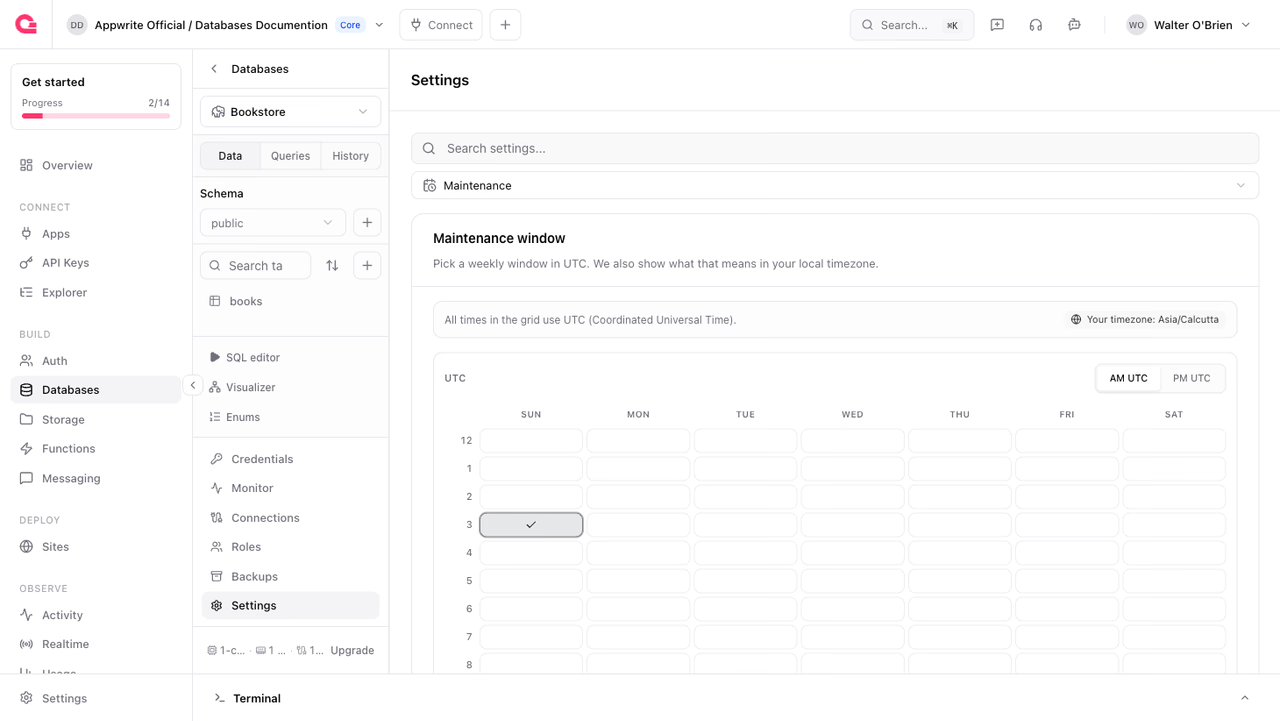
Routine maintenance that can briefly affect the database runs inside a weekly window that you choose. Set it under Settings > Maintenance in the Console by picking a day and start hour (UTC), or through the API:
import { Client, Postgresql } from 'node-appwrite';
const client = new Client()    .setEndpoint('https://<REGION>.cloud.appwrite.io/v1')    .setProject('<PROJECT_ID>')    .setKey('<YOUR_API_KEY>');
const postgresql = new Postgresql(client);
await postgresql.updateMaintenance({    databaseId: '<DATABASE_ID>',    day: 'sun',    hourUtc: 3,});
day accepts sun through sat, and hourUtc accepts 0 to 23.
Engine version upgrades
You can upgrade the PostgreSQL version online. A second instance is provisioned on the target version, data streams over with logical replication, and traffic cuts over once replication has caught up. Reads continue throughout. At the cutover the old instance is fenced read-only and existing client connections are closed, so writes pause for that moment and the application has to reconnect. The target version must be higher than the current one:
import { Client, Postgresql } from 'node-appwrite';
const client = new Client()    .setEndpoint('https://<REGION>.cloud.appwrite.io/v1')    .setProject('<PROJECT_ID>')    .setKey('<YOUR_API_KEY>');
const postgresql = new Postgresql(client);
await postgresql.createUpgrade({    databaseId: '<DATABASE_ID>',    targetVersion: '18',});
Before a major version upgrade, check that your installed extensions support the target version.
Pause and resume
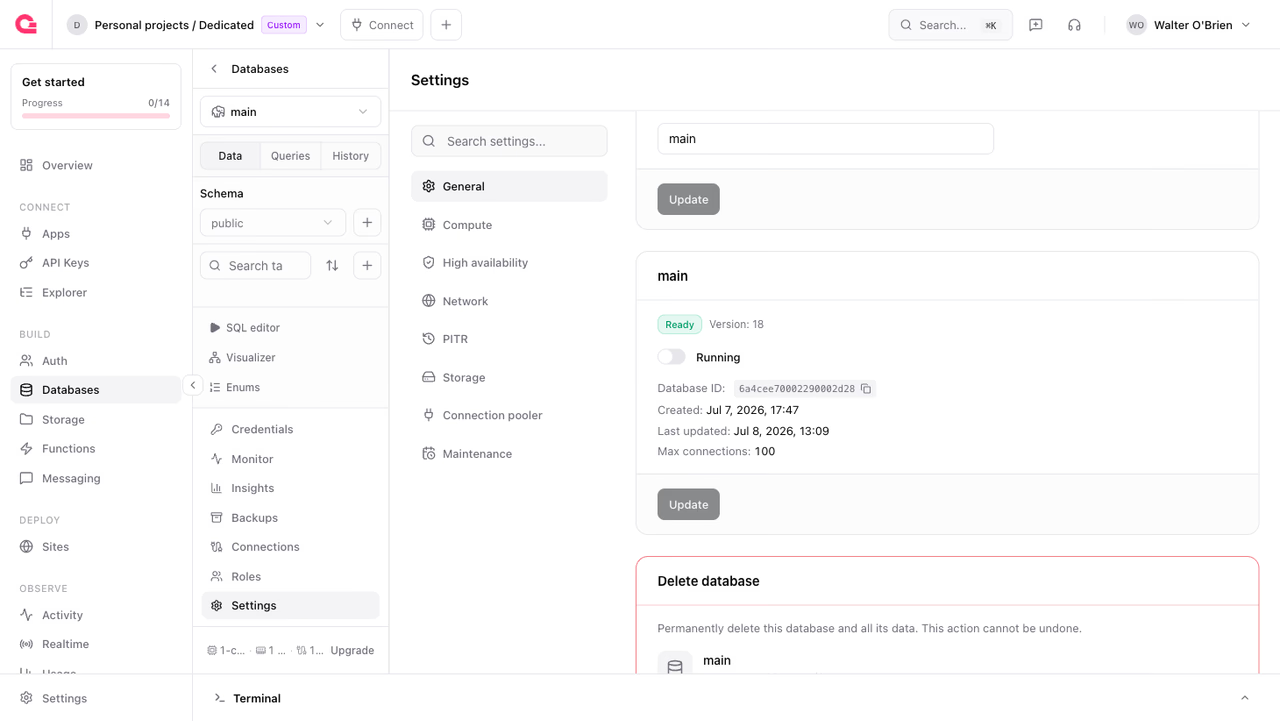
A paused database stops its compute but keeps its storage, configuration, and credentials. Pause a database you are not using to stop paying for compute; resume it when you need it again. In the Console, open Settings > General and use the Running toggle in the Details card, then click Update to apply it. From the API, update the status:
import { Client, Postgresql } from 'node-appwrite';
const client = new Client()    .setEndpoint('https://<REGION>.cloud.appwrite.io/v1')    .setProject('<PROJECT_ID>')    .setKey('<YOUR_API_KEY>');
const postgresql = new Postgresql(client);
await postgresql.update({    databaseId: '<DATABASE_ID>',    status: 'paused',});
Set status back to ready to resume. Both transitions are asynchronous: the request returns immediately and the database moves through pausing or resuming before settling. A database in the failed state can also be recovered by setting its status to ready.
Lifecycle states
| Status | Meaning |
|---|---|
provisioning | Being created |
ready | Online and accepting connections |
scaling | A configuration or specification change is being applied |
pausing | Transitioning to paused |
paused | Compute stopped, storage retained |
resuming | Transitioning back to ready |
restoring | A backup or point-in-time restore is in progress |
upgrading | An engine version upgrade is in progress |
migrating | A migration is in progress |
failing-over | A replica is being promoted to primary |
inactive | Idle and scaled down to zero |
deleting | Deletion is in progress |
deleted | Deletion has finished |
failed | An infrastructure error occurred; the database can be resumed |
Deleting a database
Delete a database from Settings > General in the Console, or programmatically. The database moves to deleting and the teardown runs in the background. Deleting a database also deletes its backups, so export anything you need first.
Was this page helpful?
Share what worked or what we should fix. Once approved, our agents automatically apply suggested updates to the docs.