Premium Geo DB_
Add city, time zone, ISP, AS number, and connection type to IP geolocation in an Appwrite Cloud project with the Premium Geo DB add-on.
5 min read
Appwrite looks up the client IP of every request to find out where it came from. On every plan, the lookup returns the country, continent, EU membership, and currency. Premium Geo DB is a project add-on that switches the lookup to a more detailed database. It adds the city, region, postal code, coordinates, and time zone of the IP, and details of the network behind it: ISP, autonomous system, and connection type.
Once the add-on is active, the extra attributes appear in Firewall conditions, in your project's usage breakdowns, and in responses from the Locale API.
Premium Geo DB is available on Appwrite Cloud for organizations on the Pro plan.
Attributes
Every plan includes these attributes:
| Attribute | Locale API field | Description |
|---|---|---|
| Country | countryCode, country | ISO 3166-1 country code and localized country name |
| Continent | continentCode, continent | Two-letter continent code and localized continent name |
| EU membership | eu | Whether the country is part of the European Union |
| Currency | currency | ISO 4217 currency code for the country |
Premium Geo DB adds these attributes:
| Attribute | Locale API field | Description |
|---|---|---|
| City | city | City of the IP |
| State | - | State or region of the IP. Available in Firewall conditions |
| Postal code | postalCode | Postal code of the IP |
| Latitude | latitude | Approximate latitude of the IP |
| Longitude | longitude | Approximate longitude of the IP |
| Time zone | timeZone | Name of the time zone |
| Weather code | - | Weather code associated with the location. Available in Firewall conditions |
| ISP | isp | Internet service provider of the IP |
| AS number | autonomousSystemNumber | Autonomous System Number (ASN) of the IP |
| AS organization | autonomousSystemOrganization | Organization that owns the ASN |
| Connection type | connectionType | Connection type of the IP, such as Cable/DSL, Cellular, or Corporate |
| Connection usage type | connectionUsageType | What the network is used for, such as residential, cellular, business, or hosting |
| Connection organization | connectionOrganization | Registered organization of the IP |
Without the add-on, the premium fields are empty in every response.
Where the data appears
Firewall
All 13 premium attributes become available as Firewall conditions. The network attributes separate data center traffic from residential and mobile connections, which country conditions cannot do.
The add-on also enables the Block hosting provider traffic preset in the Scraping prevention group under Add preset on the Firewall page. It denies API requests whose connection usage type is hosting, which covers cloud providers, VPS hosts, and data centers.
Server-side SDKs, Functions, and your own backends also run on hosting networks. Before you deny hosting traffic, add a bypass rule with a lower priority number for your trusted callers, and check the impact preview. Match the bypass on the IP addresses your servers send from. Do not match on a custom header alone, because any caller can send the same header and skip your deny rules.
Usage
The Usage page of your project breaks down requests by cities, ISPs, AS numbers, AS organizations, connection types, connection usage types, and connection organizations. Without the add-on, these breakdowns show an upgrade prompt.
The Firewall rule wizard uses the same data. Its impact preview charts the top values in recent traffic for the attribute a condition uses, so you can pick an ISP or AS number from real requests.
Locale API
The get method of the Locale API returns the location of the IP that sent the request. With Premium Geo DB, the response includes the location and network fields listed under Attributes. The client SDKs declare them as optional fields on the Locale model.
Call it from a client SDK. From a server SDK, the IP that sends the request is your server's, so you get your server's location.
import { Client, Locale } from "appwrite";
const client = new Client()    .setEndpoint('https://<REGION>.cloud.appwrite.io/v1') // Your API Endpoint    .setProject('<PROJECT_ID>');                 // Your project ID
const locale = new Locale(client);
const result = await locale.get();
console.log(result.city, result.timeZone, result.isp);
Sessions and activity
Auth sessions created while the add-on is active record the same location and network details. Activity events show them while the add-on is active.
Enable Premium Geo DB
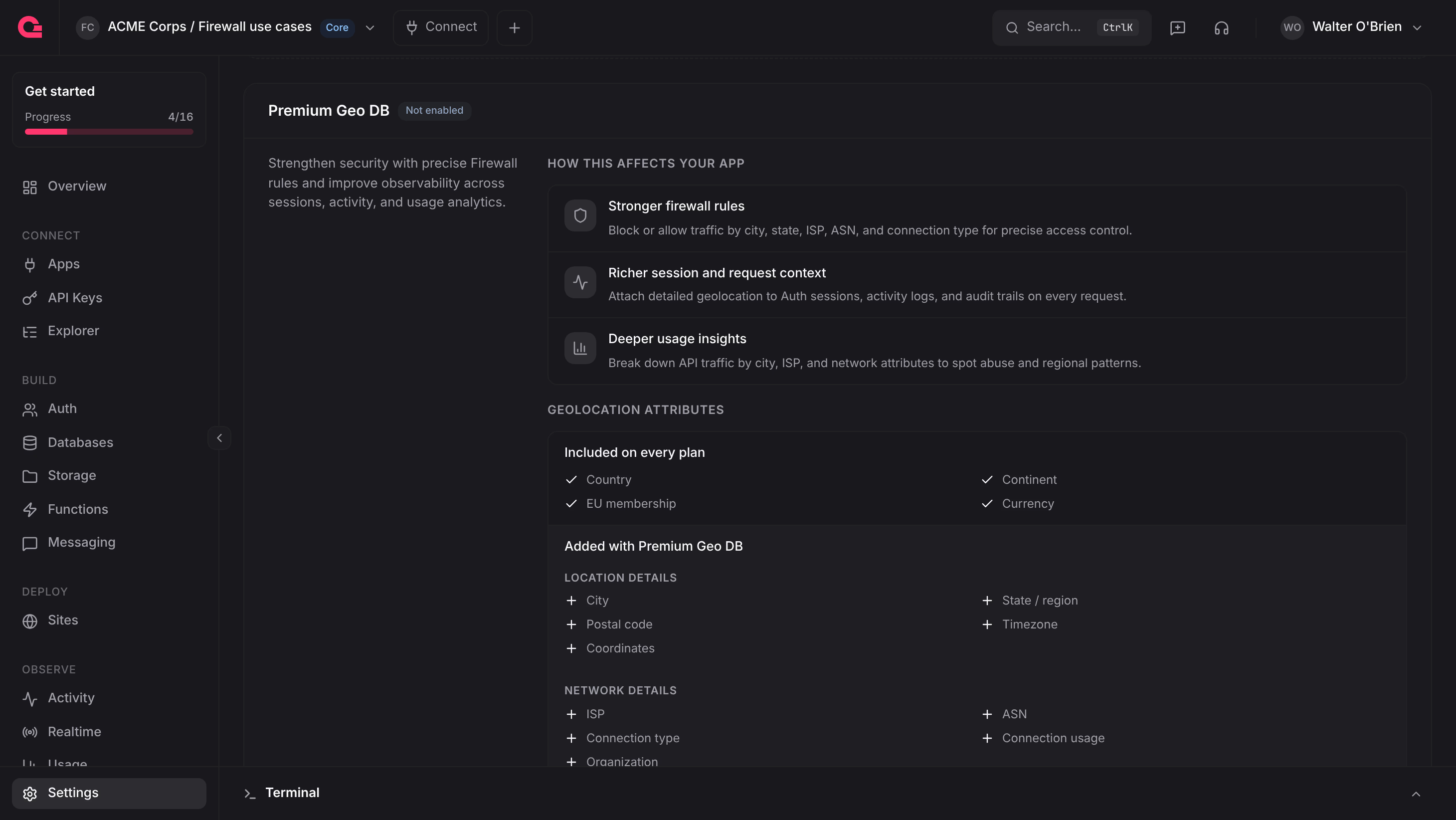
- In the Appwrite Console, open your project and go to Settings.
- On the Overview tab, find the Premium Geo DB card.
- Click Enable Premium Geo DB.
- Review the monthly price and the prorated amount due today, then click Enable.
If your bank asks for payment authentication, the card shows Payment pending until you complete it. Click Refresh afterwards to confirm the payment. On the Free plan, the card shows Upgrade plan instead.
Requests use the premium database as soon as the add-on is active.
Pricing
Premium Geo DB costs $10 per project per month. When you enable it, Appwrite charges your organization's payment method the prorated amount for the days left in the current billing cycle. After that, the full monthly price is added to each invoice. Prices exclude applicable taxes and fees.
Each project needs its own add-on.
Disable Premium Geo DB
Click Disable on the Premium Geo DB card and confirm. The add-on stays active until the end of the current billing cycle and does not renew. Until then, click Keep Premium Geo DB to keep it.
When the add-on ends, Appwrite treats premium attributes as empty on API traffic. Equals conditions on them never match, and Not equal conditions match every request, so a deny rule can start denying all traffic. Rewrite or delete those rules before the add-on ends. See Conditions.
Was this page helpful?
Share what worked or what we should fix. Once approved, our agents automatically apply suggested updates to the docs.