AI in Functions_
Learn how to integrate AI capabilities into your Appwrite Functions using the Vercel AI SDK.
2 min read
Appwrite Functions let you run AI workloads on the server side, keeping API keys secure and giving you full control over how your application interacts with AI providers. Using the Vercel AI SDK, you can integrate with providers like OpenAI, Anthropic, Google, and others through a unified interface.
This guide shows how to build an Appwrite Function that generates text using the Vercel AI SDK with OpenAI.
Appwrite Functions do not currently support streaming responses. Support for streaming is coming soon. For now, use generateText to return complete responses.
Prerequisites
- An Appwrite project
- An OpenAI API key
1. Create new function
Head to the Appwrite Console then click on Functions in the left sidebar and then click on the Create Function button.
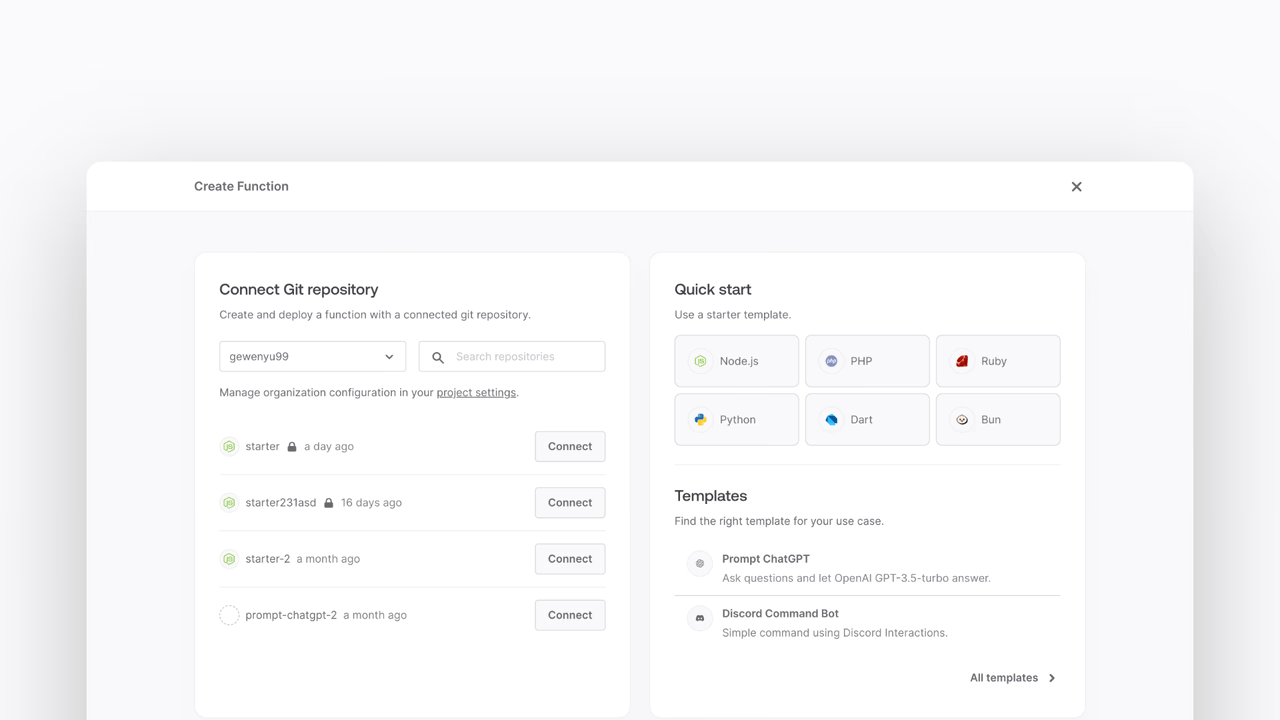
- In the Appwrite Console's sidebar, click Functions.
- Click Create function.
- Under Connect Git repository, select your provider.
- After connecting to GitHub, under Quick start, select the Node.js starter template.
- In the Variables step, add the
OPENAI_API_KEY, generate it here. For theAPPWRITE_API_KEY, tick the box to Generate API key on completion. - Follow the step-by-step wizard and create the function.
2. Add dependencies
Once the function is created, navigate to the freshly created repository and clone it to your local machine.
Install the ai package and the OpenAI provider:
npm install ai @ai-sdk/openaiThe ai package is the core Vercel AI SDK, and @ai-sdk/openai is the provider that connects it to OpenAI's API.
3. Create the function
Replace the contents of src/main.js with the following code:
import { generateText } from "ai";import { openai } from "@ai-sdk/openai";
export default async ({ req, res, log, error }) => {  if (req.path === "/api/generate") {    if (req.method !== "POST") {      return res.status(405).json({ error: "Method not allowed" });    }
    const { prompt } = req.bodyJson;    const result = await generateText({      model: openai("gpt-5-mini"),      prompt,    });
    return res.json({ text: result.text });  }
  return res.status(404).json({ error: "Not found" });};
The function exposes a POST /api/generate endpoint. It extracts the prompt from the request body, passes it to OpenAI using generateText, and returns the generated text as JSON.
The OpenAI provider reads the OPENAI_API_KEY environment variable automatically. Make sure you have set this variable in your function settings in the Appwrite Console.
4. Using other providers
The Vercel AI SDK supports many providers beyond OpenAI. You can swap providers by installing the relevant package and changing the model import.
For example, to use Anthropic:
npm install @ai-sdk/anthropicimport { anthropic } from '@ai-sdk/anthropic';
const result = await generateText({ model: anthropic('claude-sonnet-4-5-20250929'), prompt,});Or to use Google's Gemini:
npm install @ai-sdk/googleimport { google } from '@ai-sdk/google';
const result = await generateText({ model: google('gemini-2.0-flash'), prompt,});Add the corresponding API key as an environment variable in your function settings for each provider.
5. Test the function
Now that the function is deployed, test it by sending a POST request to the function's URL:
curl -X POST https://FUNCTION_DOMAIN/api/generate \ -H "Content-Type: application/json" \ -d '{"prompt": "Explain quantum computing in one sentence."}'You should receive a JSON response with the generated text:
{ "text": "Quantum computing uses quantum mechanical phenomena..."}Was this page helpful?
Share what worked or what we should fix. Once approved, our agents automatically apply suggested updates to the docs.