AGENTS.md_
Generate an AGENTS.md file to give AI agents project-specific context about Appwrite SDKs, APIs, and services.
2 min read
AGENTS.md files are instruction files that developers place in their repositories to provide context and guidelines to AI agents. These files help AI tools understand your project structure, coding conventions, and preferences, resulting in more accurate and consistent code suggestions. Most IDEs and agents support this file.
When an AI agent encounters an AGENTS.md file, it uses the instructions to tailor its responses to your specific project requirements. This includes details about your tech stack, file organization, naming conventions, and architectural patterns.
Benefits
- Project-specific context: AI agents receive tailored instructions for your exact Appwrite setup, including which SDKs, services, and frameworks you use.
- Accurate code generation: With the right context, AI agents generate code that follows your project's patterns and uses the correct SDK methods.
- No repetitive prompting: Instead of explaining your setup in every conversation, the
AGENTS.mdfile provides this context automatically. - Framework-aware: Generated rules include framework-specific patterns like SSR authentication, server actions, and routing conventions.
- API references included: The generated file links directly to the relevant Appwrite API references for your selected services.
Generate AGENTS.md
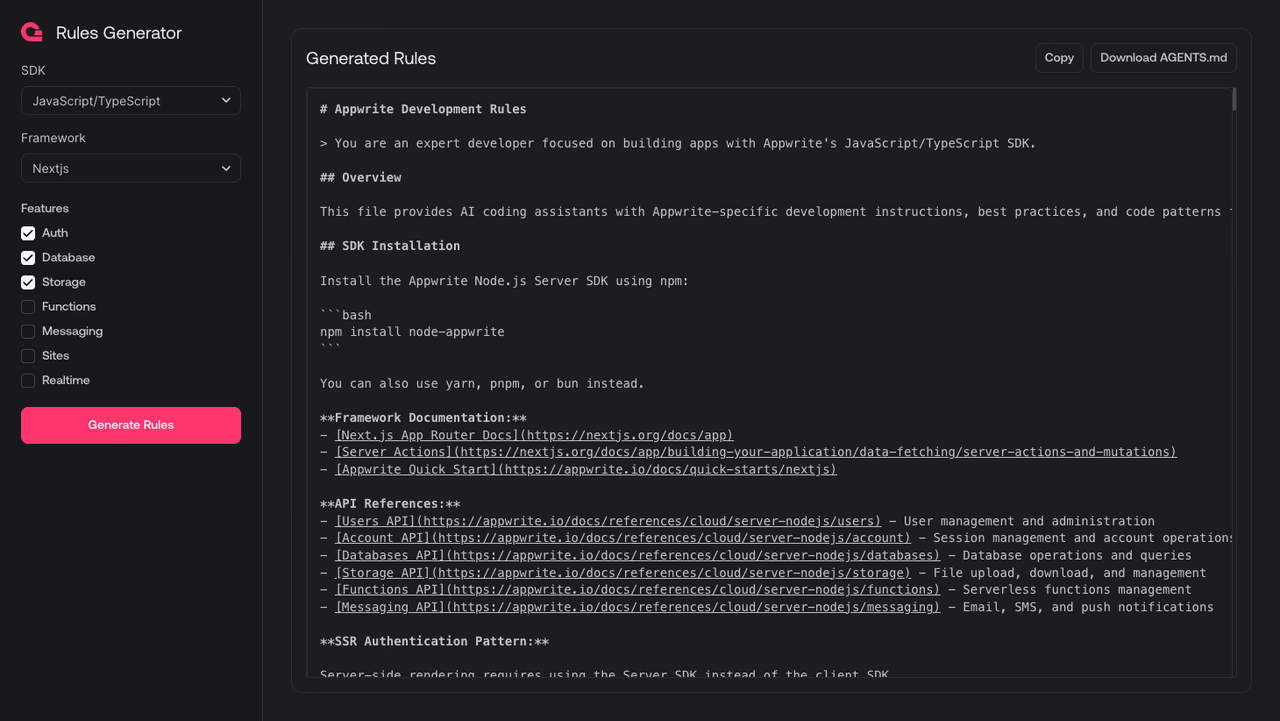
Use the AGENTS.md generator to create a custom AGENTS.md file for your project.
1. Select your SDK
Choose the Appwrite SDK you use in your project. The generator supports all Appwrite client and server SDKs.
2. Select your framework
Choose the framework you are building with. The generated rules will include framework-specific patterns and best practices.
3. Select Appwrite features
Check the Appwrite services your project uses, such as Auth, Database, Storage, Functions, Messaging, Sites, and Realtime. The generated rules will only include context for the services you select.
4. Generate and download
Click Generate Rules to create your AGENTS.md file. You can copy the output or download it directly. Place the file in the root of your repository so AI agents can find it automatically.
Was this page helpful?
Share what worked or what we should fix. Once approved, our agents automatically apply suggested updates to the docs.