SMTP_
Configure a custom SMTP server to send Appwrite's account management emails from your own domain, improve deliverability, and unlock custom email templates.
2 min read
By default, Appwrite sends account management emails such as verification, password recovery, and magic URL links from a shared SMTP server. Configuring a custom SMTP server lets you send these emails through your own provider instead. This sends mail from your own domain, improves deliverability, and unlocks custom email templates.
Configure in the Console
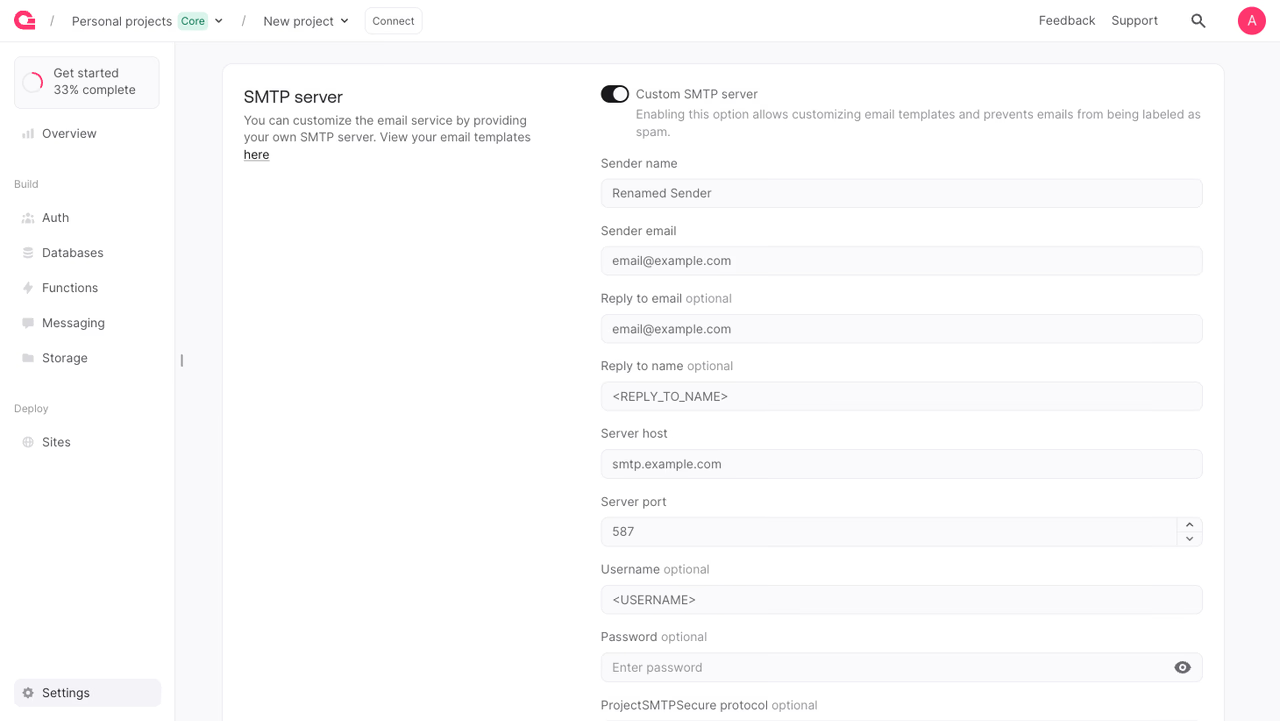
To configure a custom SMTP server from the Appwrite Console:
- Navigate to your project.
- Open the Settings section and select the SMTP tab.
- Enable Custom SMTP server.
- Enter your provider's Sender name, Sender email, Server host, and Server port. Add a Username and Password if your provider requires authentication, set a Reply to address if needed, and choose the encryption protocol (TLS or SSL).
- Click Update. Appwrite validates the connection to your SMTP server before saving, so the credentials must be correct.
Configure with a Server SDK
You can also manage SMTP programmatically using a Server SDK.
The API key used for these calls needs the project.write scope.
Configure SMTP
Every field is optional, so you can change only the values you need. Any field you omit keeps its current value. To enable SMTP, the project must have a host, port, and senderEmail set, either in this call or from a previous one. When you enable SMTP, Appwrite validates the connection to your server before saving. The encryption protocol accepts tls or ssl.
import { Client, Project, ProjectSMTPSecure } from 'node-appwrite';
const client = new Client()    .setEndpoint('https://<REGION>.cloud.appwrite.io/v1') // Your API Endpoint    .setProject('<YOUR_PROJECT_ID>') // Your project ID    .setKey('<YOUR_API_KEY>'); // Your API key
const project = new Project(client);
const result = await project.updateSMTP({    host: 'smtp.example.com',    port: 587,    username: '<USERNAME>', // optional    password: '<PASSWORD>', // optional    senderEmail: 'email@example.com',    senderName: '<SENDER_NAME>', // optional    replyToEmail: 'email@example.com', // optional    replyToName: '<REPLY_TO_NAME>', // optional    secure: ProjectSMTPSecure.Tls, // optional    enabled: true});
Send a test email
Once SMTP is configured, send a test email to confirm that your server delivers mail. Appwrite sends a sample email to each address you provide, up to a maximum of 10 recipients.
import { Client, Project } from 'node-appwrite';
const client = new Client()    .setEndpoint('https://<REGION>.cloud.appwrite.io/v1') // Your API Endpoint    .setProject('<YOUR_PROJECT_ID>') // Your project ID    .setKey('<YOUR_API_KEY>'); // Your API key
const project = new Project(client);
const result = await project.createSMTPTest({    emails: ['email@example.com']});
Benefits
- Send from your own domain. Deliver account emails from your branded sender address instead of Appwrite's shared one, so users recognize and trust them.
- Better deliverability. Routing mail through an authenticated provider, with SPF and DKIM set up on your domain, reduces the chance of verification and recovery emails landing in spam.
- Unlocks custom templates. A custom SMTP server is required to customize email templates per locale.
Was this page helpful?
Share what worked or what we should fix. Once approved, our agents automatically apply suggested updates to the docs.