Sign in with Appwrite_
Build apps that access your users' Appwrite projects and organizations with consent-based, scoped OAuth2 tokens instead of pasted API keys.
3 min read
Appwrite is an OAuth 2.1 and OpenID Connect provider. Your app can send any Appwrite user to a consent screen, ask for access to the projects and organizations they choose, and receive tokens that call their project APIs directly. This is Sign in with Appwrite: the same consent flow users know from "Sign in with Google", pointed at their Appwrite account and backend.
Before this, a tool that worked with a user's Appwrite project asked them to create an API key and paste it in. The key carried whatever scopes and expiry the user picked at creation, worked for one project only, and lived outside their control once pasted. With Sign in with Appwrite, the user approves once, picks the projects your app can reach, and can revoke everything from their account page at any time.
This section is for apps that build on top of Appwrite itself. To make your own product an OAuth2 provider so that third parties can offer "Sign in with your product", see the OAuth2 server documentation.
What you can build
Your app authenticates the user once and then acts on their Appwrite resources with the scopes they granted.
- Dashboards and monitors that read usage, logs, and data across the projects a user selects.
- Deployment tools that push functions and sites into a customer's project without holding a key.
- CLIs and devices that sign in with a short user code instead of a browser redirect.
- AI agents and MCP clients that operate under scopes the user can narrow to read-only.
How it works
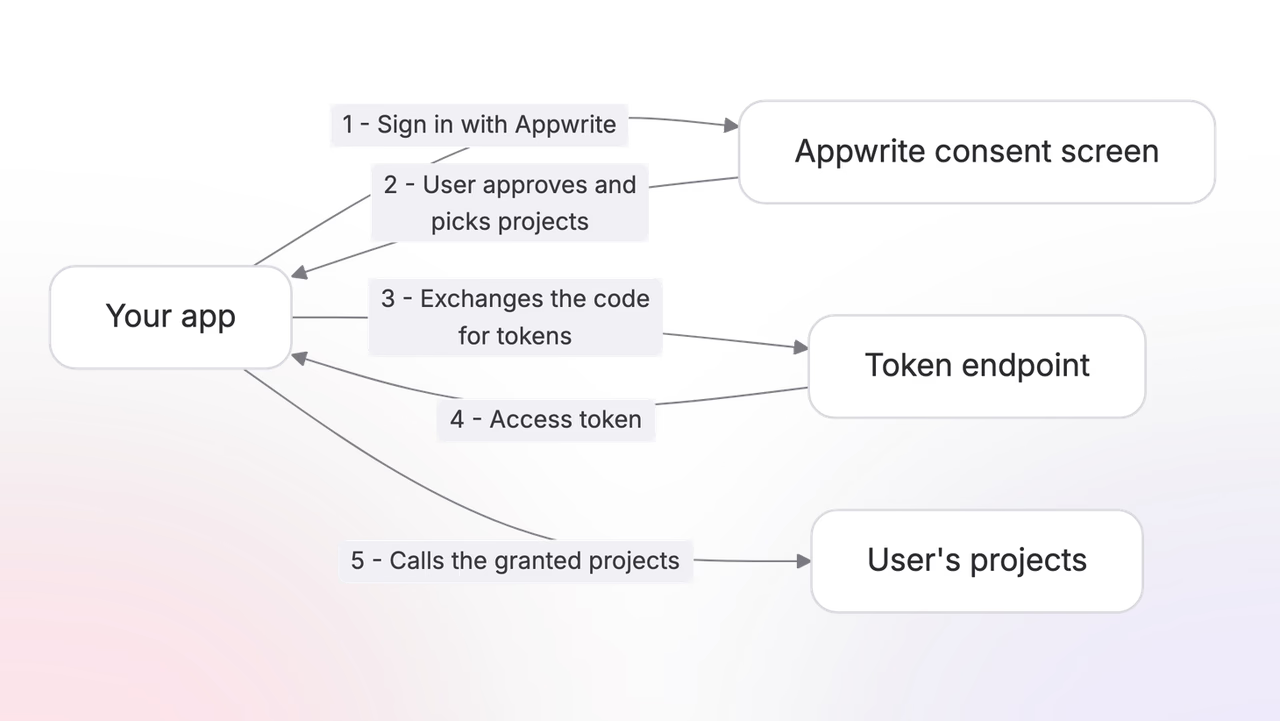
Sign in with Appwrite is the authorization code flow from OAuth 2.1, served by Appwrite.
- Your app redirects the user to the Appwrite authorization endpoint with the scopes it needs.
- Appwrite shows the consent screen. The user sees your app's name and logo, reviews the requested permissions, and picks which projects and organizations they apply to. They can grant fewer projects than you asked for, or decline entirely.
- Your app receives an authorization code at its redirect URI and exchanges it for an access token, a refresh token, and an ID token.
- Your app calls Appwrite APIs with the access token as a bearer token, on any of the granted projects, in any region.
Because the provider is spec-compliant, any OAuth2 or OIDC library works against the discovery document without Appwrite-specific code:
https://cloud.appwrite.io/v1/oauth2/console/.well-known/openid-configurationUsers stay in control after the redirect too. Every authorization appears on their account's applications page, where they see the scopes your app holds and the tokens issued under it, and can revoke a token family or the whole authorization at any time.
Explore
Quick start
Register an app and run the full flow, from consent to your first authorized API call.
Registration
Register your app in the Console and shape its consent screen listing.
Scopes
The scope catalog and how grants target specific projects and organizations.
Consent
What users see, what they can change, and what your app receives.
Tokens
Use, refresh, and revoke the tokens Appwrite issues to your app.
Dashboards
Build a read-only dashboard over the projects a user selects.
Deployments
Deploy functions and sites into a user's project with write scopes.
Device flow
Sign in from CLIs and devices with a short user code.
Agents
Connect AI agents and MCP clients to your users' projects.
Was this page helpful?
Share what worked or what we should fix. Once approved, our agents automatically apply suggested updates to the docs.