Auth methods_
Enable or disable authentication methods on your Appwrite project programmatically using server SDKs.
2 min read
Each Appwrite project ships with a configurable set of authentication methods, including email and password, magic URL, email OTP, phone, anonymous sessions, JWT, and team invites. Methods can be toggled on or off from the Appwrite Console under Auth > Settings, or programmatically through any server SDK using the Project service.
When a method is disabled, the matching account endpoints reject requests for that project until it is re-enabled.
Toggle from the Console
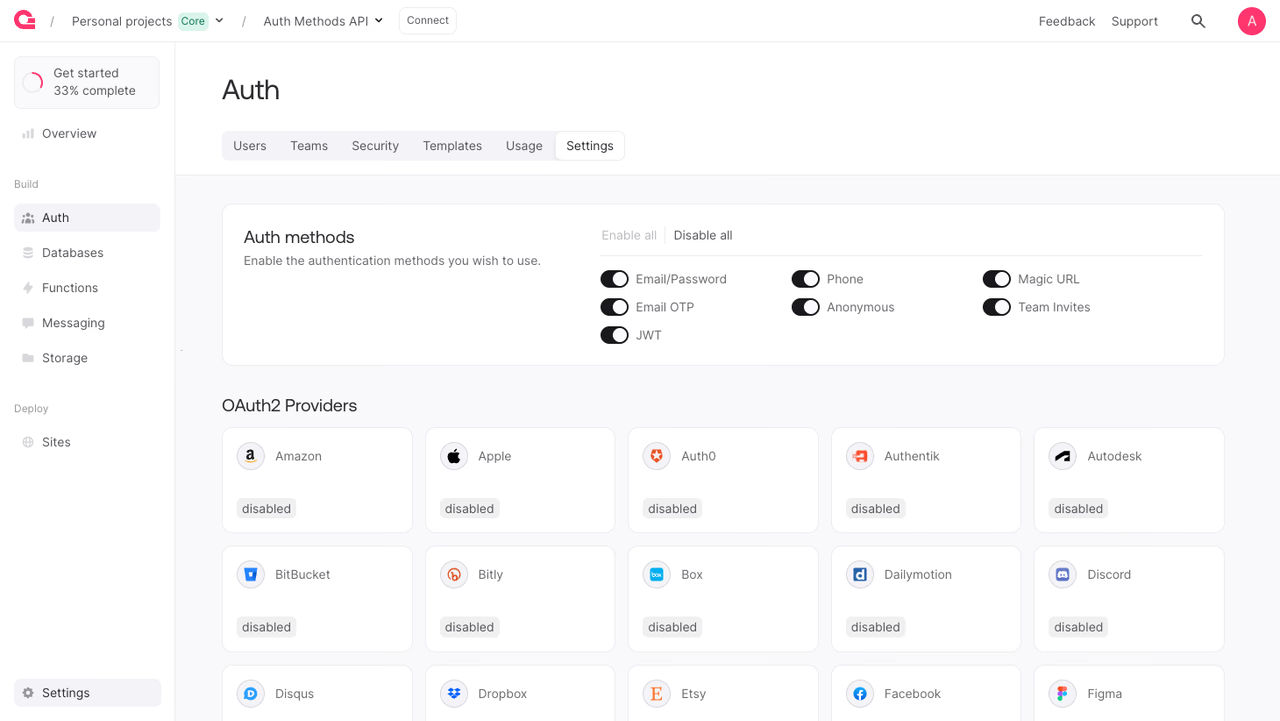
To toggle auth methods manually:
- Open your project in the Appwrite Console.
- Navigate to Auth in the sidebar, then open the Settings tab.
- In the Auth methods card, toggle individual methods on or off, or use Enable all or Disable all for bulk changes.
- Changes take effect immediately. No deploy or restart is required.
OAuth2 providers are configured separately in the OAuth2 Providers section on the same page.
Method IDs
The methodId parameter accepts one of the following values:
| Method ID | Description |
|---|---|
email-password | Email and password sign-up and login. |
magic-url | Passwordless login using a magic link sent to the user's email. |
email-otp | Time-based one-time password sent to the user's email. |
phone | SMS-based phone authentication. |
anonymous | Guest sessions for unauthenticated visitors. |
invites | Team invitations for collaborative access. |
jwt | JWT-based authentication for delegated access. |
Enable or disable a method
Use the Project service updateAuthMethod endpoint with a method ID and the enabled flag.
The API key used for these calls needs the project.write scope.
import { Client, Project, ProjectAuthMethodId } from 'node-appwrite';
const client = new Client()    .setEndpoint('https://<REGION>.cloud.appwrite.io/v1')    .setProject('<PROJECT_ID>')    .setKey('<YOUR_API_KEY>');
const project = new Project(client);
const result = await project.updateAuthMethod({    methodId: ProjectAuthMethodId.Emailpassword,    enabled: false});
The endpoint returns the updated Project document with the new method state applied.
Was this page helpful?
Share what worked or what we should fix. Once approved, our agents automatically apply suggested updates to the docs.