Tokens_
Use, refresh, and revoke the tokens Appwrite issues to your app through Sign in with Appwrite.
5 min read
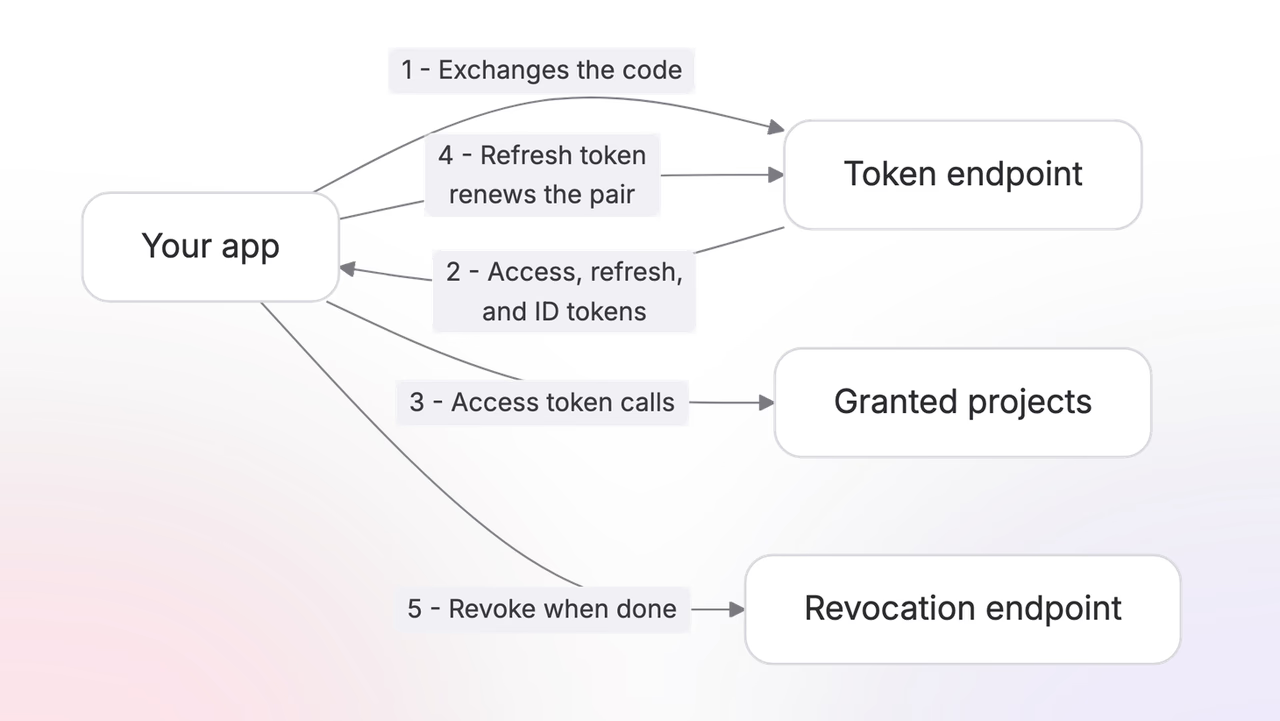
Your app holds three tokens with different jobs:
- The access token calls APIs.
- The refresh token replaces expired access tokens.
- The ID token proves who signed in.
All three come from one call. After the user approves your app on the consent screen, exchange the authorization code at the token endpoint, sending your client credentials in the request body:
curl -X POST https://cloud.appwrite.io/v1/oauth2/console/token \ -H "Content-Type: application/json" \ -d '{ "grant_type": "authorization_code", "code": "<CODE>", "redirect_uri": "<REDIRECT_URI>", "client_id": "<CLIENT_ID>", "client_secret": "<CLIENT_SECRET>" }'The response carries all three tokens, along with what the user granted:
{ "access_token": "eyJ0eXAiOiJhdCtqd3QiLCJhbGciOiJSUzI1NiJ9...", "token_type": "Bearer", "expires_in": 28800, "refresh_token": "eyJhbGciOiJIUzI1NiJ9...", "scope": "openid profile email project:databases.read", "authorization_details": [{ "type": "project", "identifiers": ["6a357f7e001c7237296b"] }], "id_token": "eyJhbGciOiJSUzI1NiJ9..."}Public clients
Mobile apps, desktop apps, and SPAs cannot keep a client secret, so they register as public clients and prove themselves with PKCE (RFC 7636) instead. Before redirecting the user, generate a random code_verifier, hash it with SHA-256, and send the hash along in the authorization request:
https://cloud.appwrite.io/v1/oauth2/console/authorize ?client_id=<CLIENT_ID> &redirect_uri=<REDIRECT_URI> &response_type=code &scope=openid profile email project:databases.read &code_challenge=<CODE_CHALLENGE> &code_challenge_method=S256The challenge is not optional: a public client authorizing without one is redirected back with error=invalid_request. At the token endpoint, the original verifier replaces the client secret:
curl -X POST https://cloud.appwrite.io/v1/oauth2/console/token \ -H "Content-Type: application/json" \ -d '{ "grant_type": "authorization_code", "code": "<CODE>", "redirect_uri": "<REDIRECT_URI>", "client_id": "<CLIENT_ID>", "code_verifier": "<CODE_VERIFIER>" }'The response carries the same three tokens, on shorter leases: access tokens last 1 hour and refresh tokens 30 days, against 8 hours and 365 days for confidential clients.
Access tokens
The access token is a JWT of type at+jwt (RFC 9068), signed with RS256. Its claims carry the whole grant:
sub: the user who signed in.client_id: your app.scope: the granted scopes.authorization_details: the granted projects and organizations.- The standard JWT claims:
iss: who issued the token, alwayshttps://cloud.appwrite.io/v1/oauth2/console.aud: who the token is for, the Appwrite API.exp: when the token expires, as a Unix timestamp.iat: when the token was issued.jti: a unique ID for this token.auth_time: when the user last authenticated.
Decoded, the payload reads:
{ "iss": "https://cloud.appwrite.io/v1/oauth2/console", "aud": ["https://cloud.appwrite.io/v1/console"], "sub": "6a150ace003bc4c2919e", "client_id": "horizon", "scope": "openid profile email project:databases.read", "authorization_details": [{ "type": "project", "identifiers": ["*"] }], "exp": 1784832895, "iat": 1784804095, "jti": "d0fe924a1fe6113ba1bab1eaf631603d", "auth_time": 1784803731, "tokenId": "6a61f2f3c94806401116"}Pass it as a bearer token in the Authorization header. The userinfo endpoint is the simplest call to try it on:
curl https://cloud.appwrite.io/v1/oauth2/console/userinfo \ -H "Authorization: Bearer <ACCESS_TOKEN>"The response is the signed-in user:
{ "sub": "6a150ace003bc4c2919e", "name": "Walter O'Brien", "email": "walter@example.com", "email_verified": true, "updated_at": 1784707579}The same token works in two places:
- The listing endpoints, to see which projects and organizations the user granted.
- Every granted project's API, whatever region the project lives in.
Your app never handles regions itself. Take each project's endpoint from the listing, call it, and send the same token.
Access tokens last 8 hours for confidential clients and 1 hour for public ones.
Refresh tokens
When the access token expires, exchange the refresh token for a new pair:
curl -X POST https://cloud.appwrite.io/v1/oauth2/console/token \ -H "Content-Type: application/json" \ -d '{ "grant_type": "refresh_token", "refresh_token": "<REFRESH_TOKEN>", "client_id": "<CLIENT_ID>", "client_secret": "<CLIENT_SECRET>" }'The response is a fresh pair, in the same shape as the original exchange:
{ "access_token": "eyJ0eXAiOiJhdCtqd3QiLCJhbGciOiJSUzI1NiJ9...", "token_type": "Bearer", "expires_in": 28800, "refresh_token": "eyJ0eXAiOiJKV1QiLCJhbGciOiJIUzI1NiJ9...", "scope": "openid profile email project:databases.read", "id_token": "eyJ0eXAiOiJKV1QiLCJhbGciOiJSUzI1NiJ9..."}Refresh tokens are single-use. Each exchange invalidates the token you sent and returns a new one, so store the new token as soon as the response arrives.
This is deliberate. A refresh token that gets used twice looks like theft, and Appwrite responds by killing the entire token family. The user has to authorize your app again. The most common way to trip this by accident is a crash between refreshing and saving, after which your app retries with the token it already spent.
Refresh tokens last 365 days for confidential clients and 30 days for public ones. Treat them like passwords and store them encrypted.
ID tokens
The ID token is an OpenID Connect JWT, issued when the grant includes openid. It answers one question: who signed in. Decoded, it looks like this:
{ "iss": "https://cloud.appwrite.io/v1/oauth2/console", "sub": "6a150ace003bc4c2919e", "aud": "horizon", "name": "Walter O'Brien", "email": "walter@example.com", "email_verified": true, "updated_at": 1784707579, "auth_time": 1784617272, "iat": 1784711196, "exp": 1784739996, "at_hash": "ro6WSzsVqgrWqQy4m7_DGA"}The granted scopes decide which of these fields the token carries:
profileaddsnameandupdated_at.emailaddsemailandemail_verified.phoneaddsphone_numberandphone_number_verified.
Never use the ID token to call APIs; it only tells your app who signed in, and Appwrite rejects it as a bearer token. To fetch fresh values for the same fields, call the userinfo endpoint with the access token.
Validating tokens
Your app never needs to check a token before using it. Every Appwrite API validates the bearer token on each call and rejects anything expired or revoked, so the normal move is to send the token and handle the 401.
Decoding the token still helps in two places:
- UX: read
explocally and send the user to sign-in the moment the token expires, instead of letting a request fail first. - Your own API: if your backend accepts Appwrite access tokens from its clients, verify them like any JWT against the published keys:
https://cloud.appwrite.io/v1/oauth2/console/.well-known/jwks.jsonCheck the signature, the iss claim, the audience, the expiry, and require the at+jwt type so an ID token can never pass as an access token.
Signature checks cannot see revocation, so your own API accepts a revoked token until it expires; the short access token lifetime bounds that window. Appwrite's own APIs reject revoked tokens the moment revocation happens.
Revocation
Revoke tokens when a user disconnects your app:
curl -X POST https://cloud.appwrite.io/v1/oauth2/console/revoke \ -H "Content-Type: application/json" \ -d '{ "token": "<REFRESH_TOKEN>", "client_id": "<CLIENT_ID>", "client_secret": "<CLIENT_SECRET>" }'The response is an empty 200, whether or not the token existed, as RFC 7009 requires. Revoking either token of a pair invalidates both.
Revocation also arrives from outside your app. Users revoke from their account applications page, and reuse detection tears tokens down on its own. Treat a 401 with a previously working token as the signal to re-authorize, not to retry.
Was this page helpful?
Share what worked or what we should fix. Once approved, our agents automatically apply suggested updates to the docs.