Server Side Rendering (SSR) apps generate HTML content dynamically on the server for each request and send fully rendered pages to the browser. This approach improves performance for the initial load and enhances SEO since search engines can easily index the content. While SSR can be slightly slower than static apps due to server-side processing, it provides a good balance between performance and interactivity.
Since Appwrite's CDN supports dynamic content delivery, any server-side processing implemented in your site will be executed at your user's nearest edge location. The CDN also uses advanced compression algorithms to reduce data transfer sizes and improve delivery times of your site content. Any data relevant to other Appwrite products that you have integrated in your site, such as Auth, Databases, Storage, Functions, and Messaging, will be served from your project's pre-selected region.
Configuring your Appwrite Site to use SSR
When Appwrite builds your site for the first time, it scans your project's configuration files to determine whether the website should be rendered as static pages or using SSR.
If you need to manually update these settings, here are the steps to do so:
- Navigate to your site in the Appwrite Console and head to the Settings tab > Build settings section
- Select the Server side rendering checkbox (you may need to update your project codebase depending on your framework option)
- Confirm that the appropriate install command, build command, and output directory are set
- Click on the Update button and redeploy your site
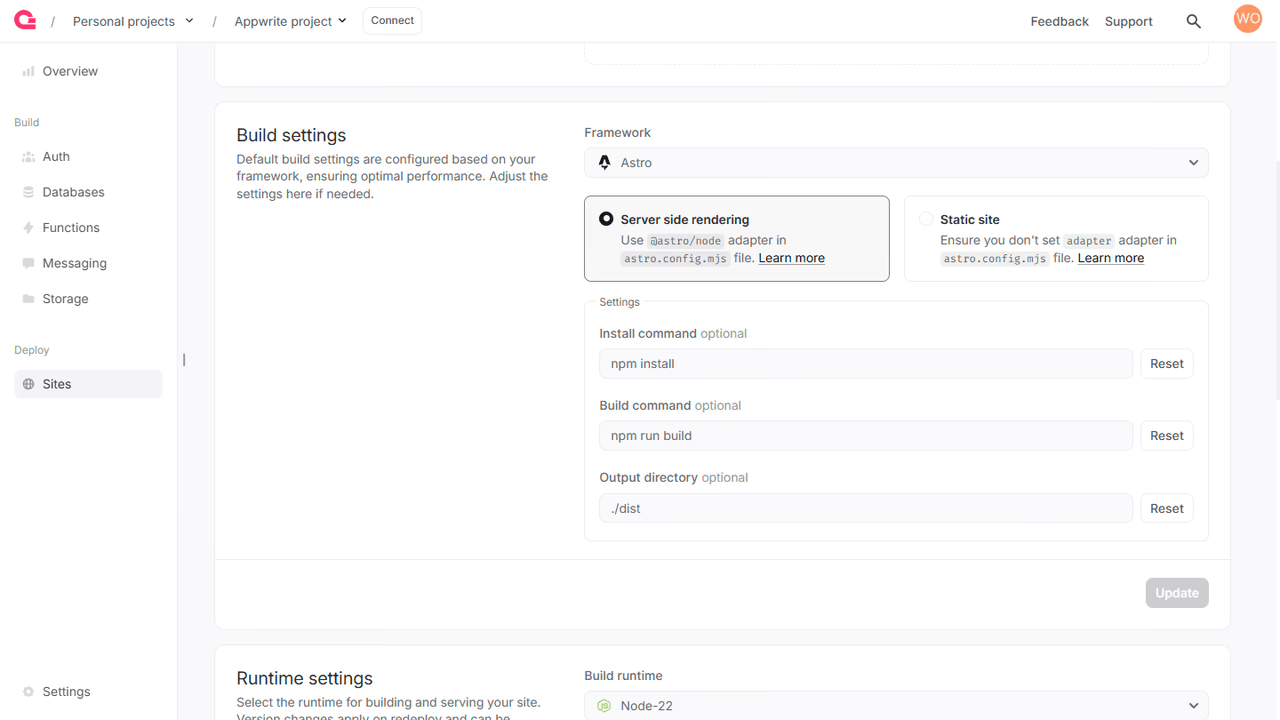
Enabling SSR builds on your web app
To enable SSR builds for your web app, you may need to make some additional updates in case of the following frameworks:
Authenticating with Appwrite
SSR code can call Appwrite in two ways. To act on behalf of a signed-in visitor, forward their session as described in Server-side rendering with Appwrite Auth. To act as the server, use the ephemeral API key that Appwrite sends on the x-appwrite-key header of every SSR request. The key is limited to the scopes granted to the site and expires on its own, so the site needs no stored API key.
Appwrite-specific environment variables
You can access several environment variables pertaining to your Appwrite project in SSR apps.
| Variable | Description | Available at Build and/or Run Time |
|---|---|---|
APPWRITE_SITE_API_ENDPOINT | The API endpoint of the running site | Both |
APPWRITE_VERSION | The Appwrite version used to run the site | Both |
APPWRITE_REGION | The region where the site will run from | Both |
APPWRITE_DEPLOYMENT_TYPE | The deployment source type, such as manual, cli, or vcs | Both |
APPWRITE_SITE_API_KEY | The ephemeral API key for the build, scoped to the site | Build time |
APPWRITE_SITE_ID | The ID of the running site | Both |
APPWRITE_SITE_NAME | The name of the running site | Both |
APPWRITE_SITE_DEPLOYMENT | The deployment ID of the running site | Both |
APPWRITE_SITE_PROJECT_ID | The project ID of the running site | Both |
APPWRITE_SITE_RUNTIME_NAME | The runtime name of the running site | Both |
APPWRITE_SITE_RUNTIME_VERSION | The runtime version of the running site | Both |
APPWRITE_SITE_CPUS | The CPU (runtime) specification of the running site | Both |
APPWRITE_SITE_MEMORY | The memory (runtime) specification of the running site | Both |
APPWRITE_VCS_REPOSITORY_ID | The provider repository ID for VCS deployments | Both |
APPWRITE_VCS_REPOSITORY_NAME | The provider repository name for VCS deployments | Both |
APPWRITE_VCS_REPOSITORY_OWNER | The owner of the provider repository | Both |
APPWRITE_VCS_REPOSITORY_URL | The URL of the provider repository | Both |
APPWRITE_VCS_REPOSITORY_BRANCH | The branch used for the VCS deployment | Both |
APPWRITE_VCS_REPOSITORY_BRANCH_URL | The URL of the branch used for the VCS deployment | Both |
APPWRITE_VCS_COMMIT_HASH | The commit hash used for the VCS deployment | Both |
APPWRITE_VCS_COMMIT_MESSAGE | The commit message used for the VCS deployment | Both |
APPWRITE_VCS_COMMIT_URL | The URL of the commit used for the VCS deployment | Both |
APPWRITE_VCS_COMMIT_AUTHOR_NAME | The name of the VCS commit author | Both |
APPWRITE_VCS_COMMIT_AUTHOR_URL | The URL of the VCS commit author | Both |
APPWRITE_VCS_ROOT_DIRECTORY | The root directory configured for the VCS deployment | Both |
VCS metadata variables are populated for Git deployments. For manual and CLI deployments, VCS fields may be empty.
At run time, Appwrite delivers the ephemeral API key on the x-appwrite-key request header of every SSR request instead of an environment variable.
Was this page helpful?
Share what worked or what we should fix. Once approved, our agents automatically apply suggested updates to the docs.